Images & graphics
HEIC photos from an iPhone: how to convert them to JPG
iPhones save photos as HEIC, a format some upload forms and apps don't accept. You can convert the files you already have to JPG in your browser and set the camera to save new photos as JPG.
- HNarzędzia editorial team
- Published:
HEIC is the photo format an iPhone uses when the camera is set to High Efficiency. Apple says HEIF and HEVC compress better than JPEG and H.264, so photos take up less storage on your device (Apple Support, checked October 2026). The trouble starts when you need to send the file somewhere else.
Why an upload form or a PC rejects HEIC
Upload forms for job applications, banks and government services usually list the formats they accept, most often JPG and PNG. A HEIC file fails that check even when it is small and has the right dimensions. Lowering the quality won’t help here; the format has to change.
On Windows, the built-in photo viewer doesn’t always open HEIC files. It depends on the Windows version and the extensions installed from the Microsoft Store. Some tools have the same limit: Compress image to target size and the EXIF and GPS remover accept only JPG, PNG and WebP.
Sometimes the iPhone converts the file for you. According to Apple, photos shared through AirDrop, Messages or email might be sent in a more compatible format such as JPEG if the receiving device doesn’t support HEIF. Photos imported to a computer over USB might also be converted to JPEG, unless you turn on Keep Originals under Settings > Apps > Photos. iCloud Photos keeps the original format.
Which fix to use
| Situation | What to do |
|---|---|
| You already have .heic files on your computer or phone | convert them with HEIC to JPG |
| You want new photos saved as JPG | change the format in the camera settings |
| The photo goes into a form with a file size limit | convert to JPG first, then shrink the file |
| You’re making a passport or ID photo | load the HEIC file straight into the passport photo maker |
How to convert HEIC to JPG in your browser
- Open HEIC to JPG and add your .heic or .heif files. You can add several at once.
- Keep the JPG format and 90% quality unless the file has to fit a small size limit. The quality slider goes from 50% to 100%.
- Download each file, or all of them in one ZIP archive.
Choose PNG only if you plan to keep editing the photo and want to avoid another round of lossy compression. For upload forms and sharing, JPG is enough.
Safari on iPhone and Mac decodes HEIC natively. In Chrome, Firefox and Edge, the tool downloads a decoding library on the first conversion, so the first file takes a little longer. Either way, your photos aren’t uploaded to a server.
If a HEIC file holds several images, such as a burst, the tool saves only the main one. The video part of a Live Photo is a separate MOV file and isn’t converted.
Example: a 12 MP test file
Our test file is a synthetic landscape of 4032×3024 px, the pixel count of a 12-megapixel iPhone photo. We added test EXIF data to it: a device make and model, a capture date and GPS coordinates. We saved it as HEIC with sips, the image tool built into macOS. The HEIC file was 415,846 bytes and kept all of the EXIF data, including the location.
We converted it with HEIC to JPG in a Chromium browser:
| File | Size | Dimensions | EXIF and GPS |
|---|---|---|---|
| HEIC (original) | 416 KB | 4032×3024 px | present |
| JPG, 90% quality (default) | 1.06 MB | 4032×3024 px | none |
| JPG, 80% quality | 720 KB | 4032×3024 px | none |
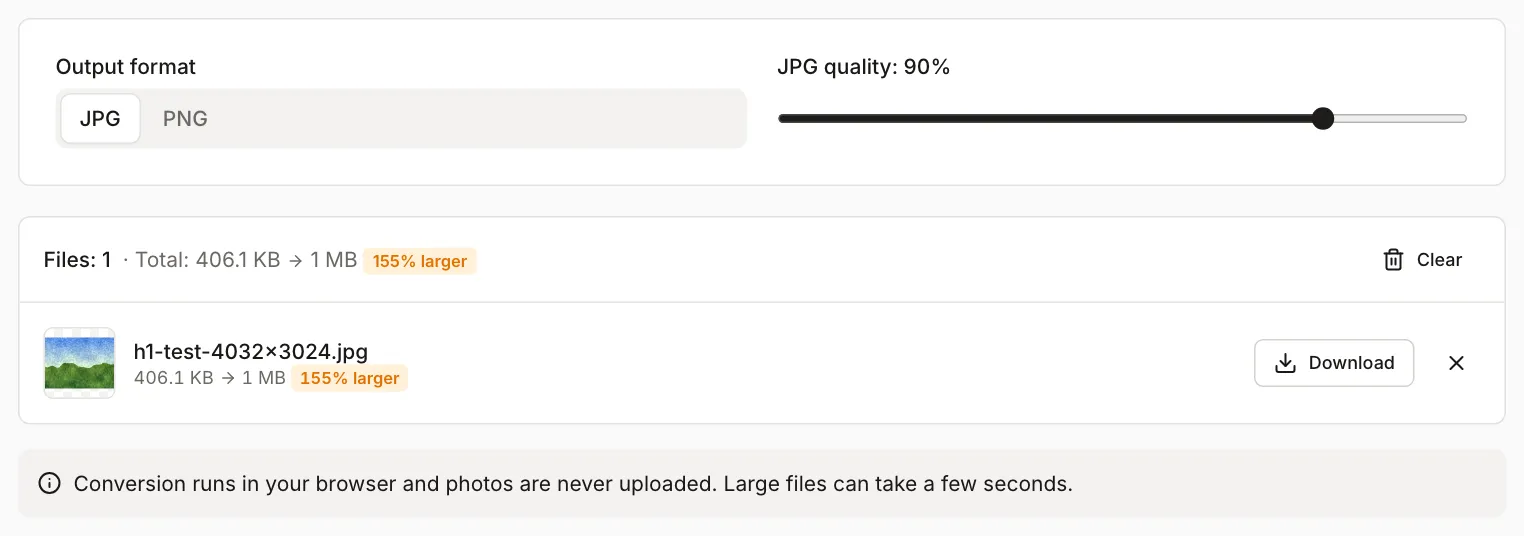
The tool counts 1 KB as 1024 bytes, so the same HEIC file shows as 406.1 KB in the screenshot and 416 KB in the table, where 1 KB is 1000 bytes.
The dimensions stayed the same and the file got bigger. At 90% quality the JPG was more than 2.5 times the size of the HEIC. Real photos will give a different ratio, since it depends on what’s in the picture and on the encoder settings, but expect a JPG to be larger than a HEIC of similar quality. A 2 MB HEIC photo can end up over a size limit that the original would have met.
When the JPG is too large
Check the file size after converting at 90%. If the form has a lower limit, you have two options:
- lower the quality in the converter; in the example above, going from 90% to 80% cut the file from 1.06 MB to 720 KB,
- load the JPG into Compress image to target size and enter the form’s limit. The tool picks the quality for you.
If the form also sets maximum pixel dimensions, resize the photo with the image resizer. Our guide Image too large to upload explains how file size, dimensions and format affect each other.
What happens to the metadata
JPG files from HEIC to JPG contain no EXIF data. The tool redraws the photo and saves only the pixels, so the file has no capture date, phone model or GPS location. We checked the example files with the same code the EXIF and GPS remover uses.
That helps when you send a photo to a form or a stranger, because the file doesn’t reveal where it was taken. It’s a drawback for archiving: the capture date that photo libraries usually sort by is gone. Keep the HEIC originals and treat the JPGs as copies for sending.
If you convert with another app, or the iPhone converts the file when you share it, don’t assume the metadata is gone. Check the JPG with the EXIF and GPS remover. For other things to check before sharing a photo, see What to check before sharing a photo.
When to change the camera setting
To make your iPhone save new photos as JPG, go to Settings > Camera > Formats and choose Most Compatible (Apple Support, checked October 2026). Photos you took earlier stay in HEIC. To switch back, choose High Efficiency in the same place.
The change makes sense if you often upload photos to forms, work on a Windows PC, or send files to people who can’t open HEIC. JPG photos take more space on your phone and in iCloud, though. If you only send a photo now and then, keep HEIC and convert single files when you need to.
If an iPhone photo is meant for a passport or ID application, you don’t need to convert it first. See How to make a 35×45 mm passport photo at home.