Developers
Fix invalid JSON: how to find and fix the most common errors
Your parser says "Unexpected token" and nothing else. See what a validator reports for each of the usual JSON mistakes, how to read the line and column it points to, and when valid JSON still changes your data.
- HNarzędzia editorial team
- Published:
Invalid JSON usually comes down to one of a dozen familiar mistakes: a trailing comma, single quotes, an unquoted key, a comment, NaN, or a file cut off halfway. Parsers report them tersely (“Unexpected token”), so it helps to use a tool that gives the line, the column and a snippet with a caret. Paste the document into the JSON formatter, read the first error, fix it and paste again. The document is processed in your browser and is never sent to a server.
How to read the line, column and character
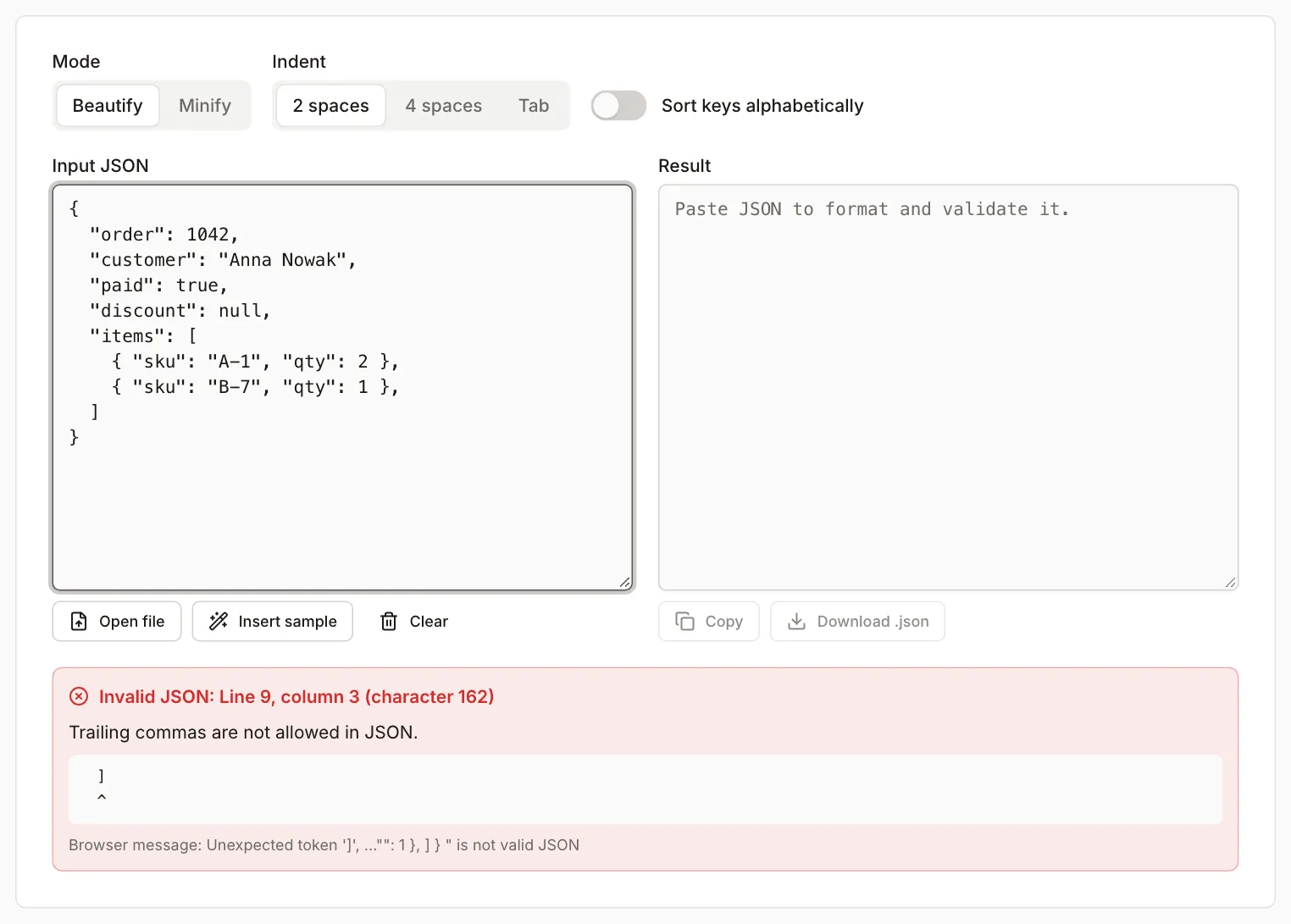
The tool reports three numbers, for example “Line 9, column 3 (character 162)”. Line and column start at 1. “Character” is a zero-based index (the first character of the document is character 0), the same number as in the browser’s own message (“at position 162”). Under the offending line the tool prints a ^ marker.
Three things to know up front:
- The validator stops at the first error. A document with six mistakes needs six fixes (see the worked example below).
- The position is the first character the parser cannot accept, which is not always where the mistake is. A missing comma at the end of line 3 is reported at the start of line 4.
- The “Browser message” line under the error comes from your browser’s JSON engine and is in English. Its wording depends on the browser, and we measured it in Chromium. The line, column and plain-language description come from the tool’s own validator.
What the validator reports for common errors
The test document is a synthetic order: 10 lines, 165 bytes. In each broken file we changed exactly one thing and pasted it into the tool. Positions below are what the English interface showed.
| What is in the file | Reported position | Tool description |
|---|---|---|
Comma after the last array item ({ ... }, before ]) |
line 9, column 3 (the ]) |
Trailing commas are not allowed in JSON |
Comma after the last object member (], before }) |
line 10, column 1 (the }) |
same message |
Single quotes around a value: 'Anna Nowak' |
line 3, column 15 | Unexpected character, a value was expected |
Unquoted key: paid: true |
line 4, column 3 | Expected a double-quoted property name |
// comment on its own line |
line 2, column 3 | Comments (// and /* */) are not allowed in JSON |
/* ... */ comment after a comma |
line 4, column 17 | same message about comments |
NaN, undefined or Infinity as a value |
line 5, column 15 | Unexpected character, a value was expected |
Curly quotes around a value: “Anna Nowak” |
line 3, column 15 | Unexpected character, a value was expected |
| Curly quotes around a key | line 3, column 3 | Expected a double-quoted property name |
| Non-breaking space (U+00A0) after the colon | line 4, column 10 | Unexpected character, a value was expected |
Invisible zero-width space (U+200B) before true |
line 4, column 11 | Unexpected character, a value was expected |
| Missing comma between members | line 4, column 3 | Expected a comma or closing brace |
Missing colon: "paid" true |
line 4, column 10 | Expected a colon after the property name |
Leading zero: 01042 |
line 2, column 13 | Invalid number |
+1042, .5 |
line 2, column 12 | Unexpected character, a value was expected |
Hexadecimal number 0x41 |
line 2, column 13 | Expected a comma or closing brace |
Windows path "C:\Users\Anna" |
line 3, column 18 | Invalid escape sequence |
| Line break inside a quoted string | line 3, column 20 | Unescaped control character, use \n |
Missing closing quote: "Anna Nowak, |
line 3, column 27 (end of line) | Unescaped control character in a string |
Missing ] before } |
line 9, column 1 | Expected a comma or closing bracket |
Two documents in one file, or text after the closing } |
line 11, column 1 | Unexpected data after the end of the document |
HTML response instead of JSON (<!DOCTYPE html>) |
line 1, column 1 | Unexpected character, a value was expected |
What this means in practice:
- A comment has its own description and a hint (remove it or move the note into a separate key). An unquoted key gets “Expected a double-quoted property name…”, and the browser message is the same for both errors (“Expected property name…”).
- Single-quoted values,
NaN,undefinedandInfinityalso share one description. The first character under the^tells them apart. - A missing closing quote is reported as a problem with the end of the line, not with the quote. If the message talks about a control character and there is no line break inside the text, check that every string is closed.
- For a missing comma or a missing bracket, the tool points at the next line. The cause sits at the end of the previous one.
Characters you cannot see
Non-breaking spaces, zero-width spaces and curly quotes usually arrive by copying from a word processor, a document or a web page. The validator points at them correctly (see the table), but on screen they look harmless: under the ^ there is either what looks like an ordinary space or nothing at all.
A tip from our measurements: when the browser message shows a character in quotes that looks like a space, or empty quotes (Unexpected token ' '), and the line looks fine, the character is invisible. Delete the part the ^ points at and retype it on the keyboard. Replace curly quotes “ and ” with plain ".
A BOM at the start of the file
A BOM (U+FEFF, three bytes EF BB BF in UTF-8) is a marker some programs add at the start of a file. Here is how the test file with a BOM behaved:
- The formatter ignores a single BOM at the start and shows “Valid JSON”. When the BOM is in pasted text, a note appears below: “The text starts with a byte order mark (U+FEFF). The result leaves it out, because some programs reject JSON with a BOM.” A file opened with “Open file” gets no note, because the browser strips the BOM when it reads the file. Two BOMs in a row produce an error, at line 1, column 1.
- The downloaded result (“data.json”, 196 bytes) starts with
{, without a BOM. Formatting and downloading therefore removes the character. - The same file in Node.js 24 (
JSON.parseon text fromfs.readFileSync(file, 'utf8')) fails with “Unexpected token”, and in Python 3.14 (json.load) with “Unexpected UTF-8 BOM (decode using utf-8-sig)”. We ran the Node and Python checks locally, outside the tool.
So “Valid JSON” alone in the formatter does not guarantee that every program will read the file. RFC 8259 (section 8.1) forbids adding a BOM to JSON exchanged between systems and allows parsers to skip one, but does not require it. If the file is headed for an application, use the downloaded result.
The CSV to JSON converter also removes a BOM from pasted text in the JSON to CSV direction, so text with a BOM goes through without an error.
A truncated file
A download cut off midway, a partial copy or an API response chopped by a character limit all look the same: the parser reaches the end of the text and is missing a closing character. For a file cut off after { "sku": "B-7" the tool pointed at line 8, column 19 (where the file ends) and said “Unexpected end of input. A closing bracket, quote or value is missing.” For a file cut inside a string ("Anna Now) the result is the same, with column 24 on line 3.
If “Unexpected end of input” shows up for a file that should be complete, check that the whole thing was copied and that the document has as many { as } and as many [ as ]. If someone sent you the file, download it again.
A response that is not JSON at all looks similar. Pasted text that starts with <!DOCTYPE html> gives an error at line 1, column 1, because the first character is <. That usually means an error page (a 502, or a redirect to a login page), so check the URL and the server response rather than the syntax.
JSON, JSON5 and JavaScript objects
Many “JSON errors” are valid text in another format. A JavaScript object literal allows unquoted keys, single quotes, comments, trailing commas and NaN. JSON allows none of these.
- RFC 8259 (December 2017, Internet Standard STD 90, checked October 2026) defines a grammar where commas separate items and none follows the last one. It has no rule for comments. Numbers are decimal with no leading zeros, and
NaNandInfinityare not permitted (section 6). - ECMA-404, 2nd edition, December 2017 (checked October 2026), describes the same syntax.
- JSON5 (checked October 2026) is a separate format. It adds comments, trailing commas, single quotes, unquoted keys, hexadecimal numbers,
+1,.5,InfinityandNaN. A JSON validator rejects such a document.
What to do: if the file is a configuration file with comments and your program accepts JSON5 or JSONC, leave it alone. If it is going to an API or to JSON.parse, remove the comments, wrap keys in ", change ' to ", delete trailing commas, and replace NaN and undefined with null or drop the field. Use null deliberately, because it changes what the data means.
Worked example: a document with six errors, fixed in seven rounds
The test document is written like a small JavaScript object:
{
  // shop
  name: 'Anna',
  "tax": NaN,
  "tags": ["a", "b",],
}
We pasted it into the tool and fixed one thing after each message:
| Round | Tool result | Fix |
|---|---|---|
| 1 | line 2, column 3: expected a property name (the // comment) |
delete the comment line |
| 2 | line 2, column 3: expected a property name (name) |
change to "name" |
| 3 | line 2, column 11: unexpected character (') |
change 'Anna' to "Anna" |
| 4 | line 3, column 10: unexpected character (the N of NaN) |
change NaN to null |
| 5 | line 4, column 21: trailing comma before the closing bracket | delete the comma before ] |
| 6 | line 5, column 1: trailing comma before the closing brace | delete the comma after ] |
| 7 | Valid JSON, 3 keys, depth 2, 85 B | done |
The first two rounds point at the same spot (line 2, column 3), because once the comment is gone the unquoted key sits there.
Valid JSON does not mean unchanged data
“Valid JSON” means the syntax is fine. The values can still differ from the input, because the tool reads the document with JSON.parse and writes it back with JSON.stringify, and numbers become 64-bit floating-point values along the way. When that changes a value, yellow warnings appear under the green message. A test file with numbers gave these results:
| Input | Output | Warning |
|---|---|---|
9007199254740993 (2^53 + 1) |
9007199254740992 |
yes (line 2, column 9) |
12345678901234567890 |
12345678901234567000 |
yes (line 3, column 10) |
0.1000000000000000055 |
0.1 |
yes (line 7, column 11) |
1e400 |
null |
yes |
9007199254740991 (2^53 - 1) |
unchanged | no |
1.10 |
1.1 |
no |
1e2 |
100 |
no |
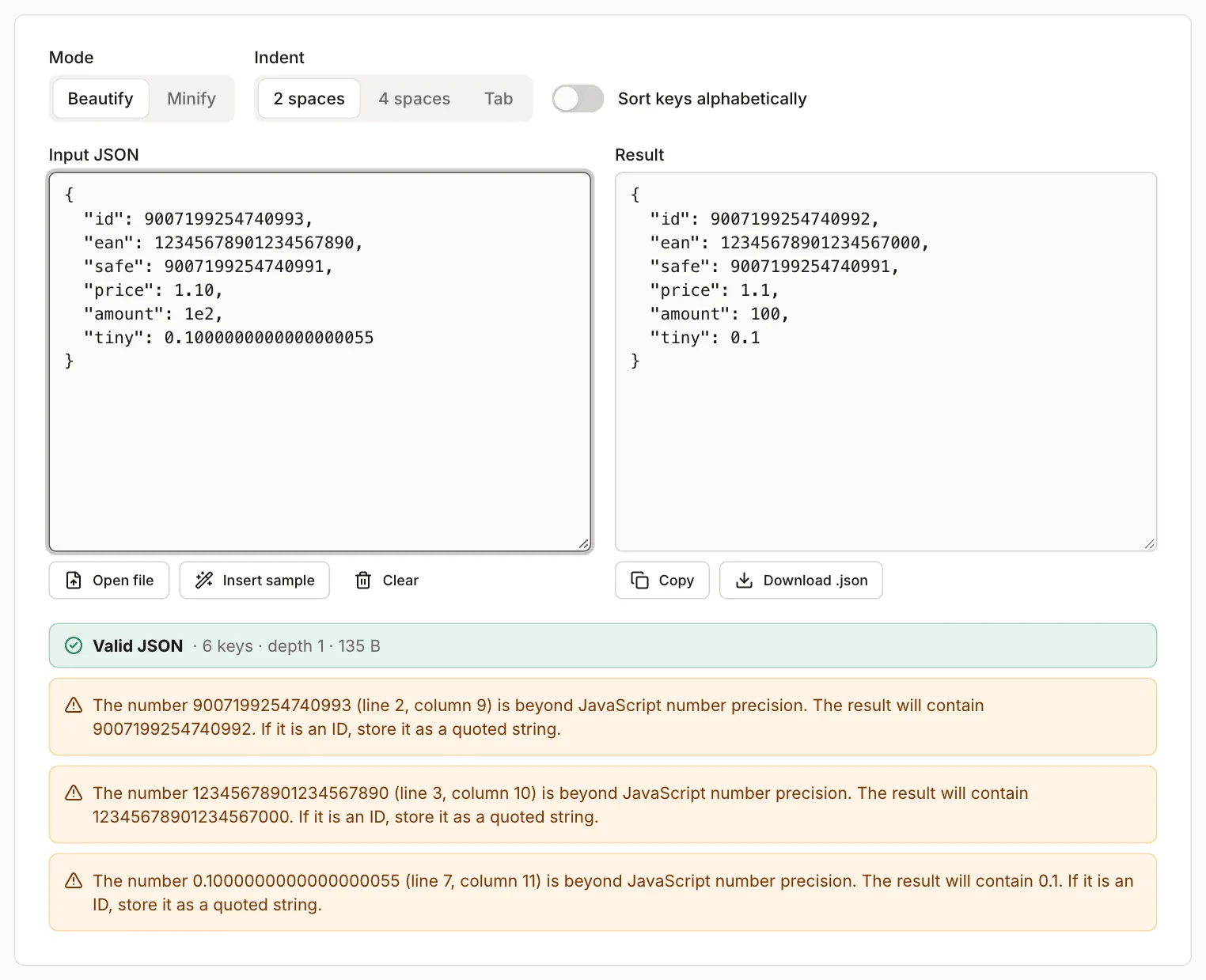
RFC 8259, section 6, points out that integers from -(2^53)+1 to (2^53)-1 have exact values that different implementations agree on. Beyond that range the result depends on the program. The warning spells out what the result will contain (for example “The result will contain 9007199254740992”) and suggests storing an ID as a quoted string. Trailing zeros and exponent notation (1.10, 1e2) are not warned about, because only the spelling changes, not the value. For identifiers and codes (EAN barcodes, account numbers, database IDs), store the value as a string: a file with "id": "9007199254740993" comes back unchanged.
Trailing zeros in a fraction do not change the value but do change the spelling: 1.10 becomes 1.1. If the spelling matters (for example a price compared as text), store it as a string.
Repeated keys are a second trap. In a file with two "paid" keys (true, then false), the tool showed “Valid JSON”, kept the last value, false, and added a warning: “The key “paid” appears more than once in the same object (line 5, column 3). The result keeps only the last value.” According to RFC 8259 (section 4), names inside an object should be unique, and the behaviour on repeats is unpredictable. Deciding which value to keep is up to you.
The CSV to JSON converter has the same trait in the JSON to CSV direction, but it warns too. The pasted document with the numbers from the table above produced 9007199254740992 and 12345678901234567000 in the CSV, and warnings appeared below the settings, for example “The number 9007199254740993 (line 2, column 9) is beyond JavaScript number precision. The CSV will contain 9007199254740992.” In the CSV to JSON direction, integers larger than 2^53 - 1 stay as text: 9007199254740993 appeared in the output in quotes, together with the code 00-950. Invalid JSON in the converter now gets a position as well, for example “Invalid JSON: line 9, column 3” with the same description as in the formatter, but without the snippet and ^ marker. For a repeated key the converter warns, like the formatter, that the CSV keeps only the last value (in our test paid ended up as false).
Beautify or minify
Beautifying adds indentation and line breaks, minifying removes unnecessary whitespace. Neither repairs a document: invalid JSON is not formatted or minified until the validator passes it without errors.
The test order file is 165 B. After processing in the tool:
| Mode | Result |
|---|---|
| Minify | 120 B |
| Beautify, 2 spaces | 196 B |
| Beautify, 4 spaces | 248 B |
The beautified result is larger than the input file because the tool also expands objects written on one line ({ "sku": "A-1", "qty": 2 }). Beautified JSON suits reading in an editor and comparing changes, minified JSON suits request bodies and stored configuration. “Sort keys alphabetically” makes two versions of the same document easier to compare, but it changes the key order in the result.
What the tool does not do
- It does not fix errors for you. It shows the first error and a description, and you make the change.
- It checks syntax only, not conformance to a JSON Schema.
- It does not understand JSON5 or JSONC. A document with comments is treated as invalid.
- The browser messages we measured are from Chromium. In other browsers the English message may read differently, while the position and the plain-language description come from the tool’s own validator.