Developers
Cron expression examples: write a schedule without getting the hours wrong
A cron expression looks simple, and the mistake shows up a week later: the job runs too often, at the wrong hour, or never. Check the expression in a tool before you paste it into a config.
- HNarzędzia editorial team
- Published:
A cron expression is five fields separated by spaces: minute, hour, day of month, month and day of week. Three things cause most of the trouble: setting both a day of month and a day of week, the time zone of the machine that runs the job, and daylight saving time. Each one below is checked in the cron expression generator, which prints a plain-language description and the next 10 run times.
All measurements here come from Chromium driven by Playwright, with the time zone set to Europe/Warsaw and the date fixed to Sunday, October 11, 2026, 10:00 local time. The scripts are in the repository (scripts/guide-fixtures/cron-expression-examples*.mjs). In the tool you will see a list counted from your own current date.
The five fields and their ranges
| Field | Range | Notes |
|---|---|---|
| Minute | 0-59 | |
| Hour | 0-23 | 24-hour clock |
| Day of month | 1-31 | |
| Month | 1-12 or JAN-DEC | |
| Day of week | 0-7 or SUN-SAT | 0 and 7 are both Sunday |
The ranges for minute, hour, day of month and month are the same in the POSIX crontab specification. POSIX allows only 0-6 for the day of week (0 is Sunday). The 0-7 range and day names come from Vixie cron, described in the crontab(5) man page for Debian’s cron package (checked in October 2026).
Four characters work in every field:
*means every value,,makes a list (1,15),-makes a range (1-5),/sets a step (*/15means every 15 units from the start of the range).
Names such as MON-FRI are easier to read than digits, and they do not depend on whether a system counts Sunday as 0 or 7.
Common schedules, checked in the tool
We typed each expression into the generator and noted what it showed. The dates in the last column are shortened; the tool prints them in full with the weekday.
| Task | Expression | Description in the tool | First runs |
|---|---|---|---|
| daily at 3:00 | 0 3 * * * |
At 03:00 | Oct 12, Oct 13, Oct 14, … every day at 03:00 |
| weekdays at 9:00 | 0 9 * * 1-5 |
At 09:00, Monday through Friday | Mon Oct 12, Tue Oct 13, Wed Oct 14, Thu Oct 15, Fri Oct 16, then Mon Oct 19 |
| every 15 minutes | */15 * * * * |
Every 15 minutes | Oct 11 at 10:15, 10:30, 10:45, 11:00 |
| first day of the month | 0 0 1 * * |
At 00:00, on day 1 of the month | Nov 1, 2026, Dec 1, 2026, Jan 1, 2027, Feb 1, 2027 |
A few notes on this table:
*/15counts from the start of the range, so runs fall on minutes 0, 15, 30 and 45. The first run after 10:00 is 10:15 because the tool does not count the run that has just passed.1-5in the day-of-week field is Monday to Friday. Cron does not know about public holidays, so the job also runs on a day off.- Day
31skips months that do not have it. For0 0 31 * *the tool listed Oct 31, 2026, Dec 31, 2026, Jan 31, 2027, Mar 31, 2027 and May 31, 2027. November, February and April dropped out. 0 0 29 2 *runs only in leap years: the first two dates are Feb 29, 2028 and Feb 29, 2032.0 0 30 2 *never runs, and the tool says it will not run within the next 8 years.
An expression that breaks a range is rejected with a message:
| Typed | Message in the tool |
|---|---|
0 0 * * |
The expression has 4 fields; it should have 5 (…) or 6 (with seconds first) |
61 * * * * |
Field “Minute”: “61” is outside 0-59 |
0 24 * * * |
Field “Hour”: “24” is outside 0-23 |
*/0 * * * * |
Field “Minute”: invalid step in “*/0” |
Day of month and day of week: the OR rule
The most common surprise: when you give a specific value in both the day-of-month and the day-of-week field, cron does not look for a day that satisfies both. It runs the job when either one matches. The Vixie crontab(5) page says that if both fields are restricted (do not start with an asterisk), the command runs when either field matches the current time. POSIX says the same (crontab section).
Example: someone wants a job on Friday the 13th and writes 0 0 13 * 5. Compare three expressions in the tool:
| Expression | First runs from Oct 11, 2026 |
|---|---|
0 0 13 * * |
Tue Oct 13, Fri Nov 13, Sun Dec 13, Wed Jan 13, 2027 |
0 0 * * 5 |
Fri Oct 16, Oct 23, Oct 30, Nov 6, Nov 13, Nov 20 |
0 0 13 * 5 |
Tue Oct 13, then Fridays: Oct 16, Oct 23, Oct 30, Nov 6, Nov 13 |
The third expression is the union of the first two: you get every 13th and every Friday. The tool describes it as “At 00:00, on day 13 of the month, and on Friday” and shows a warning about the OR rule.
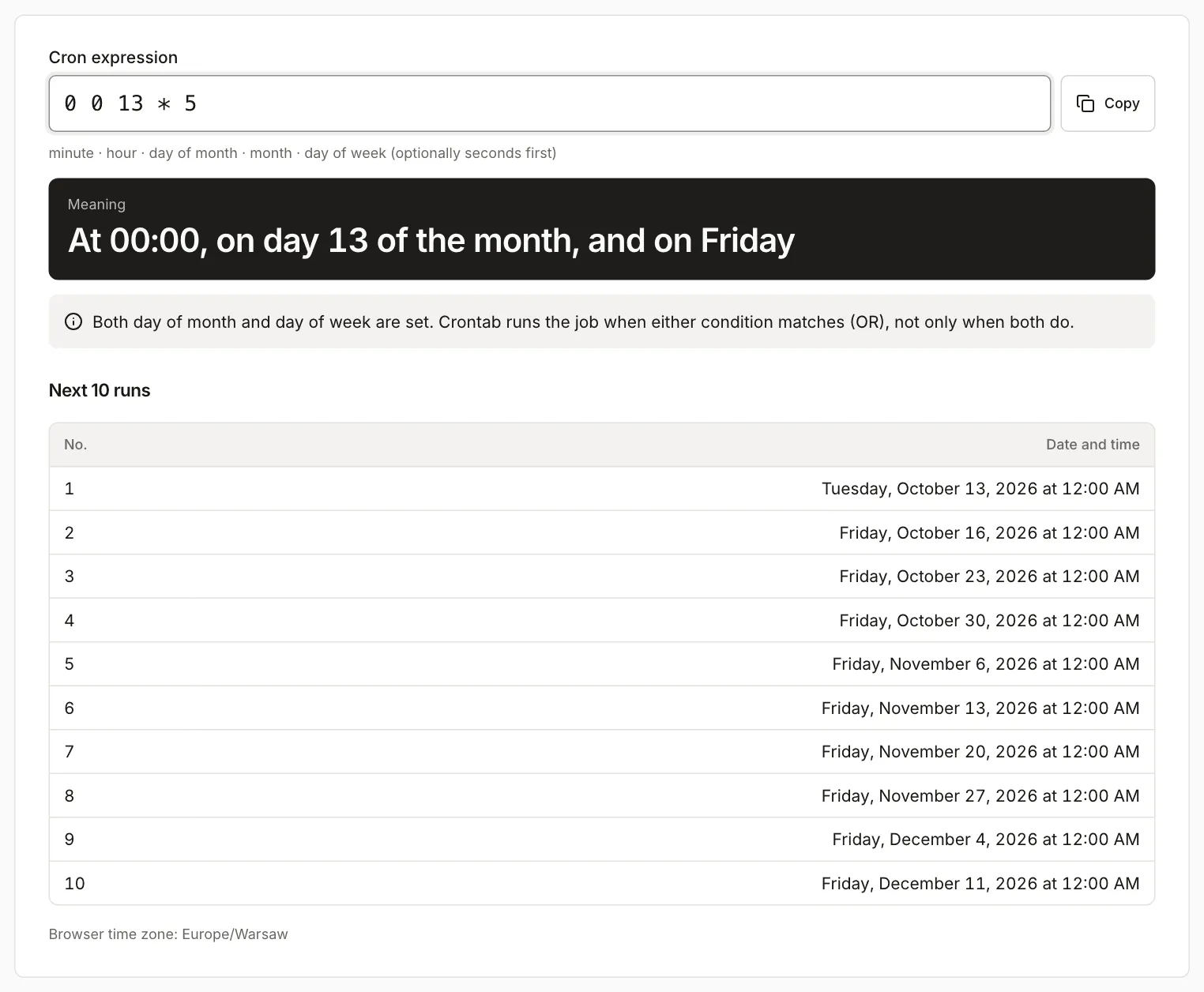
To keep only one condition:
- Put an asterisk in the field you do not need:
0 0 * * 5is every Friday, and0 0 13 * *is every 13th. - If you really need “the 13th, but only if it is a Friday”, schedule the job for Fridays and check the date inside the job (the script exits when the day of month is not 13).
A field that starts with an asterisk is not restricted, even with a step such as */2. Then both conditions must match at once: 0 0 */2 * 5 runs only on Fridays that fall on an odd day of the month. The tool listed Oct 23, Nov 13 and Nov 27, 2026, described the expression as “At 00:00, every 2 days in a month, only on Friday” and showed no OR warning.
Time zones and daylight saving time
A cron expression has no time zone. The program that runs it decides what “9:00” means:
- A plain crontab uses the server’s time zone. Cronie, one of the cron implementations in Linux distributions, also has a
CRON_TZvariable for a single table (cronie crontab(5)). - GitHub Actions uses UTC. The documentation says: “By default, scheduled workflows run in UTC” (GitHub Docs, schedule event).
- A Kubernetes CronJob without
.spec.timeZoneuses the time zone of kube-controller-manager. ThetimeZonefield has been stable since version 1.27, and puttingCRON_TZorTZinsideschedulefails validation (Kubernetes documentation).
The tool counts in your browser’s time zone and prints its name under the list (here “Europe/Warsaw”). If your server runs in another zone, the list will not match what you see in the logs.
GitHub Actions: 8:00 in Poland is two different expressions
A job that should start at 8:00 Polish time must be written in UTC for Actions, so you change it twice a year. We measured this in the Unix timestamp converter by entering 8:00 local time (Europe/Warsaw):
| Local date, 8:00 | Time in UTC (ISO 8601 in the tool) | Expression for Actions |
|---|---|---|
| July 15, 2026 | 2026-07-15T06:00:00.000Z | 0 6 * * * |
| January 15, 2027 | 2027-01-15T07:00:00.000Z | 0 7 * * * |
One expression cannot serve both seasons. You can either accept the one-hour shift or write two schedules and have the first step of the job check the local hour. The GitHub documentation also states that the shortest interval is 5 minutes, a run can be delayed under heavy load, and a schedule runs only on the default branch.
The 2:30 AM run on a clock-change night
Poland changes its clocks twice a year. In 2027 the clock jumps from 2:00 to 3:00 on Sunday, March 28, and in 2026 it goes back from 3:00 to 2:00 on Sunday, October 25. An expression like 30 2 * * * then lands on an hour that does not exist (spring) or on one that happens twice (autumn). The same applies to other regions that change their clocks, on their own dates.
What the documentation says (checked October 2026): the cronie crontab(5) page describes the matching rule itself: non-existent times, such as the “missing hours” during a daylight saving change, never match, and times that occur twice match twice. The same project’s cron(8) page, however, says the daemon handles time changes of less than 3 hours in a special way, but only for jobs at a fixed time and jobs that run less often than hourly. When the clock jumps forward, it runs the jobs from the skipped hour right away, and when the clock goes back, it avoids running them twice. More frequent jobs, such as */15, are scheduled normally. The Vixie page in Debian does not describe this case at all, so the behavior depends on the cron implementation and version. Check the documentation for your own system.
What the tool shows. Spring, current date set to Saturday, March 20, 2027, 12:00, expression 30 2 * * *:
| No. | Run |
|---|---|
| 1-7 | Sunday Mar 21 to Saturday Mar 27, 02:30 each day |
| 8 | Monday Mar 29, 02:30 |
| 9 | Tuesday Mar 30, 02:30 |
| 10 | Wednesday Mar 31, 02:30 |
Sunday, March 28 is missing from the list: the tool skips an hour that does not exist. 0 2 * * * behaves the same way. In the same test 0 3 * * * runs on March 28 at 03:00, like on any other day.
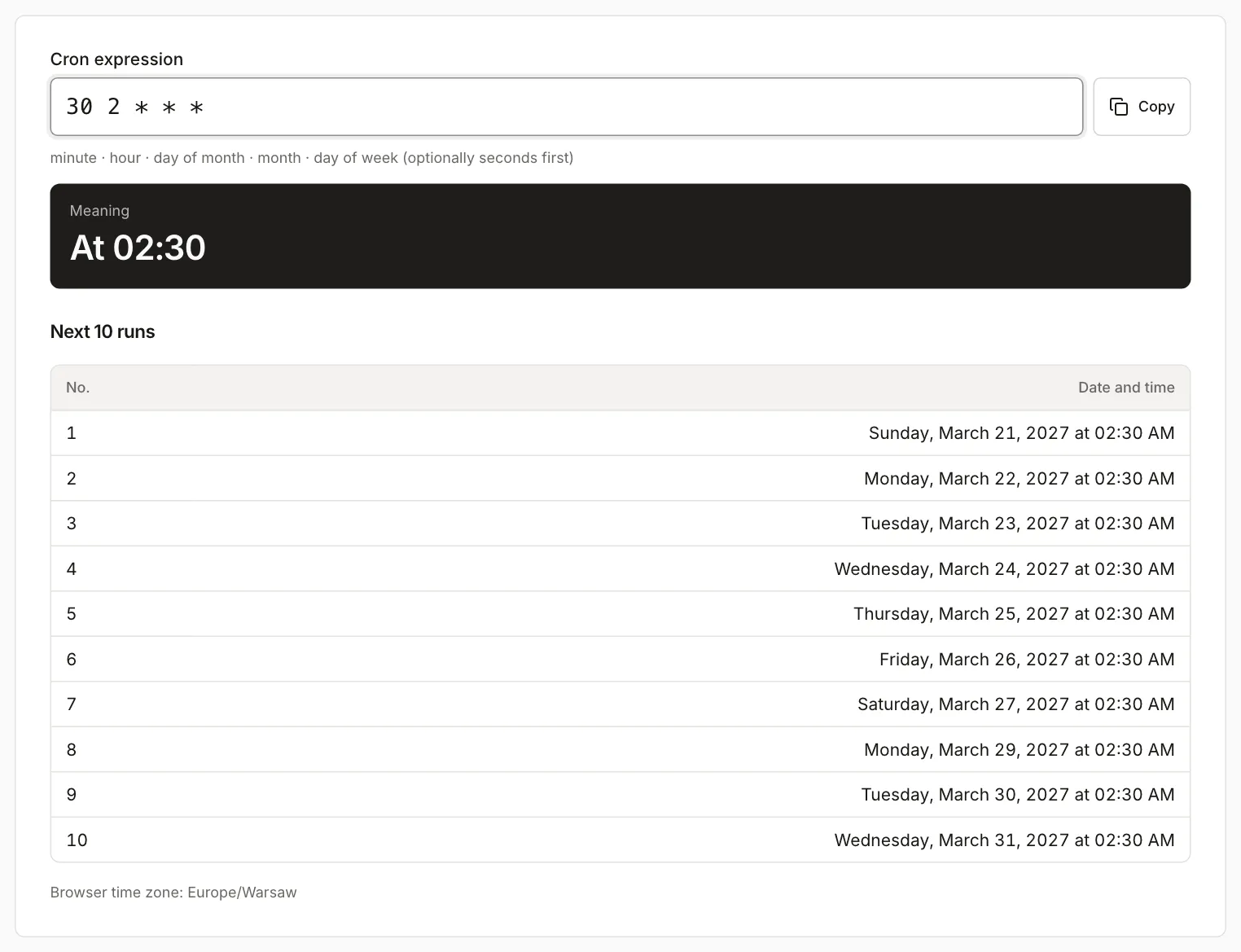
Autumn, current date set to Tuesday, October 20, 2026, 12:00, expression 30 2 * * *: the list has a single run on October 25 at 02:30 (between October 24 and 26). Under that date the tool adds: “This time occurs twice on this day because the clock goes back an hour. Some cron implementations will run the job twice.” The list keeps one entry, because whether the job runs once or twice depends on the program that runs it. In the same test 30 3 * * * has no note: 3:30 happens only once that day.
Practical conclusion: in Europe/Warsaw, do not put a job that must run exactly once into the 2:00-2:59 window. 3:00 exists on both clock-change days. That choice does not carry over to other zones: in the US the clocks change on different days and at a different hour. Another option is a server set to UTC, which has no clock changes.
How crontab, Quartz, Actions and Kubernetes differ
| System | Fields | Day of week | Time zone | Source |
|---|---|---|---|---|
| crontab (Vixie, cronie) | 5 | 0-7 or SUN-SAT, 0 and 7 are Sunday | server zone, CRON_TZ in cronie |
crontab(5) |
GitHub Actions schedule |
5 (POSIX syntax) | as in POSIX | always UTC | GitHub Docs |
| Kubernetes CronJob | 5 | 0-6 or sun-sat | controller zone or .spec.timeZone |
Kubernetes |
| Quartz | 6 or 7 (seconds first, optional year last) | 1-7 or SUN-SAT | set on the trigger | Quartz CronTrigger |
The sources in this table were checked in October 2026. Two things from the Quartz documentation are worth remembering. First, one of the two day fields must contain ? (“no specific value”), because specifying both a day of week and a day of month is not fully supported. Second, Quartz numbers the days of the week from 1 to 7, and the documentation’s own example shows that 6#3 is the third Friday of the month. In Kubernetes, ? means the same as *.
The tool understands 6 fields with seconds first and the characters L, W and #, but it adds a note that crontab, Actions and Kubernetes do not support them. When an expression has 6 fields and a ? in the day-of-month or day-of-week field, the tool treats it as Quartz and counts the days of the week from 1 (Sunday) to 7 (Saturday). If the day-of-week field contains digits, a separate note says so, and the fields table shows the range as 1-7. We checked five Quartz-style expressions:
| Expression | Description in the tool | First runs |
|---|---|---|
0 30 9 * * 1-5 |
At 09:30, Monday through Friday | Mon Oct 12, 2026 at 09:30:00, then the next weekdays |
0 0 9 ? * MON-FRI |
At 09:00, Monday through Friday | Mon Oct 12, 2026 at 09:00:00 |
0 0 9 L * ? |
At 09:00, on the last day of the month | Oct 31, Nov 30, Dec 31, 2026, Jan 31 and Feb 28, 2027, at 09:00:00 |
0 0 9 ? * 6#3 |
At 09:00, on the third Friday of the month | Fri Oct 16, Nov 20, Dec 18, 2026, at 09:00:00 |
0 0 9 ? * 5 |
At 09:00, only on Thursday | Thu Oct 15, Oct 22, Oct 29, 2026, at 09:00:00 |
Look at the first row. 0 30 9 * * 1-5 has no ?, so the tool counts its days as crontab does: 1-5 is Monday to Friday. Quartz would reject this expression, because it requires ? in one of the day fields, and in Quartz numbering 1-5 is Sunday to Thursday. If you are not sure how your scheduler numbers the days, use names (MON-FRI). They mean the same in crontab and in Quartz.
What the tool does not do
- It does not know your server: it counts in the browser’s time zone and does not check that the Actions, Kubernetes or crontab schedule uses the same one.
- It does not show the UTC offset next to run times. A time that occurs twice in autumn appears as one entry with a note, and a time that does not exist in spring is skipped without comment.
- It does not support the year field (7-field Quartz) or
@reboot; both return a message. - It looks 8 years ahead.
- The plain-language description comes from the cronstrue library, so unusual expressions can produce awkward wording. Trust the run list over the description.
To see how 8:00 or 3:00 looks in UTC, use the Unix timestamp converter. Enter the finished expression in the cron generator and compare it with the run list before you paste it into a config.