Developers
How long should a password be, and how to generate a strong one
Is 8 characters enough, do symbols help, and when is a passphrase the better choice? Answers from official sources and from calculations on the password generator's own settings.
- HNarzędzia editorial team
- Published:
NIST says a service that relies on the password alone should require at least 15 characters. For a random password, length does more than mixing character types: 16 lowercase letters give 75.2 bits of entropy, while 8 characters from all four character sets give only 50.9. If you have to memorise the password, build it from random words picked by a generator, not from words you chose yourself. For everything else, use a password manager and two-factor authentication (2FA).
What the guidance says
Sources checked in October 2026.
| Source | What it says |
|---|---|
| NIST SP 800-63B-4 (final version, 31 July 2025) | A service should require at least 15 characters when the password is the only factor. If it is just one part of multi-factor authentication, 8 is enough. Services should accept passwords of at least 64 characters, accept spaces and Unicode, allow pasting and work with password managers. They must not impose composition rules (such as “one capital letter and a digit”) or force periodic changes. A change must be forced when there is evidence the password was compromised. |
| NCSC (UK), three random words (page dated 21 December 2021) | Use three random words as a password you can remember. Avoid dates, family or pet names and your favourite team, and avoid swapping letters for lookalike digits (0 for o): criminals know the tricks and the password is no stronger. Writing passwords down is acceptable if you keep them somewhere safe. |
| NCSC, password managers | Use a password manager so every account gets its own password. A manager fills logins only on the right website, which helps against phishing. Protect the manager’s main password with two-step verification. Reusing a password is risky because one breach exposes your other accounts. |
NIST writes requirements for services, and NCSC writes advice for users. For passwords from a generator there is no reason to go below 15-16 characters.
Where entropy comes from and what the tool shows
Entropy measures how many guesses an attacker needs on average. For a random password it is bits = length × log2(number of possible characters), and every extra bit doubles the number of guesses. The formula holds only when a random generator picks the characters. A password a person made up has no such number, however complicated it looks.
In our test we set several configurations in the Password Generator in “Random password” mode and read the values from the interface. For each configuration we generated 10 passwords, and all had the requested length. With one character set the entropy shown by the tool matches the formula. With several, the tool subtracts the passwords that lack one of the sets, so the result is slightly below the formula (those rows are marked with an asterisk).
| Settings | Character pool | Formula | Entropy in the tool (bits) | Strength | Time to crack |
|---|---|---|---|---|---|
| 4 digits | 10 | 4 × log2(10) | 13.3 | Very weak | instantly |
| 8 lowercase letters | 26 | 8 × log2(26) | 37.6 | Fair | 10 s |
| 8 characters, all sets | 90 | 8 × log2(90)* | 50.9 | Fair | 1 day |
| 12 characters: letters and digits | 62 | 12 × log2(62)* | 71.3 | Strong | 4 thousand years |
| 12 characters, all sets | 90 | 12 × log2(90)* | 77.4 | Strong | 321 thousand years |
| 16 lowercase letters | 26 | 16 × log2(26) | 75.2 | Strong | 69 thousand years |
| 20 lowercase letters | 26 | 20 × log2(26) | 94 | Strong | 32 billion years |
| 16 characters: letters and digits | 62 | 16 × log2(62)* | 95.2 | Strong | 71 billion years |
| 16 characters, all sets | 90 | 16 × log2(90)* | 103.6 | Very strong | over a trillion years |
| same without look-alikes (I l 1 | O 0 o) | 83 | 16 × log2(83)* | 101.7 | Very strong | over a trillion years |
* The formula gives an upper bound. With several sets the tool counts exactly how many passwords contain a character from every set.
The pool is 26 lowercase letters, 26 uppercase, 10 digits and 28 symbols (!@#$%^&*()-_=+[]{};:,.<>/?~|). The tool rates 60 to 99 bits “Strong” and 100 or more “Very strong”.
Time to crack is an average at 10 billion guesses per second. The tool states the assumption under the result: an offline attack on a stolen database that uses a fast hash. A service that stores passwords with a deliberately slow algorithm (bcrypt, Argon2) lengthens that time, and guessing through a login form is much slower still. Treat the figure as a pessimistic scenario, not a prediction.
Length or special characters
Each character from a 26-letter pool adds 4.7 bits, and each character from the 90-character pool adds 6.5. Widening the pool pays off once, while length pays off on every character. Take 8 lowercase letters (37.6 bits): adding uppercase letters, digits and symbols gives 50.9 bits, which is 13.3 more. Adding 8 more lowercase letters gives 75.2 bits, which is 37.6 more.
That is why 16 lowercase letters (75.2 bits) beat 12 characters of letters and digits (71.3 bits) and come close to 12 characters from all sets (77.4 bits). 20 lowercase letters (94 bits) are 16.6 bits ahead of 12 characters with symbols.
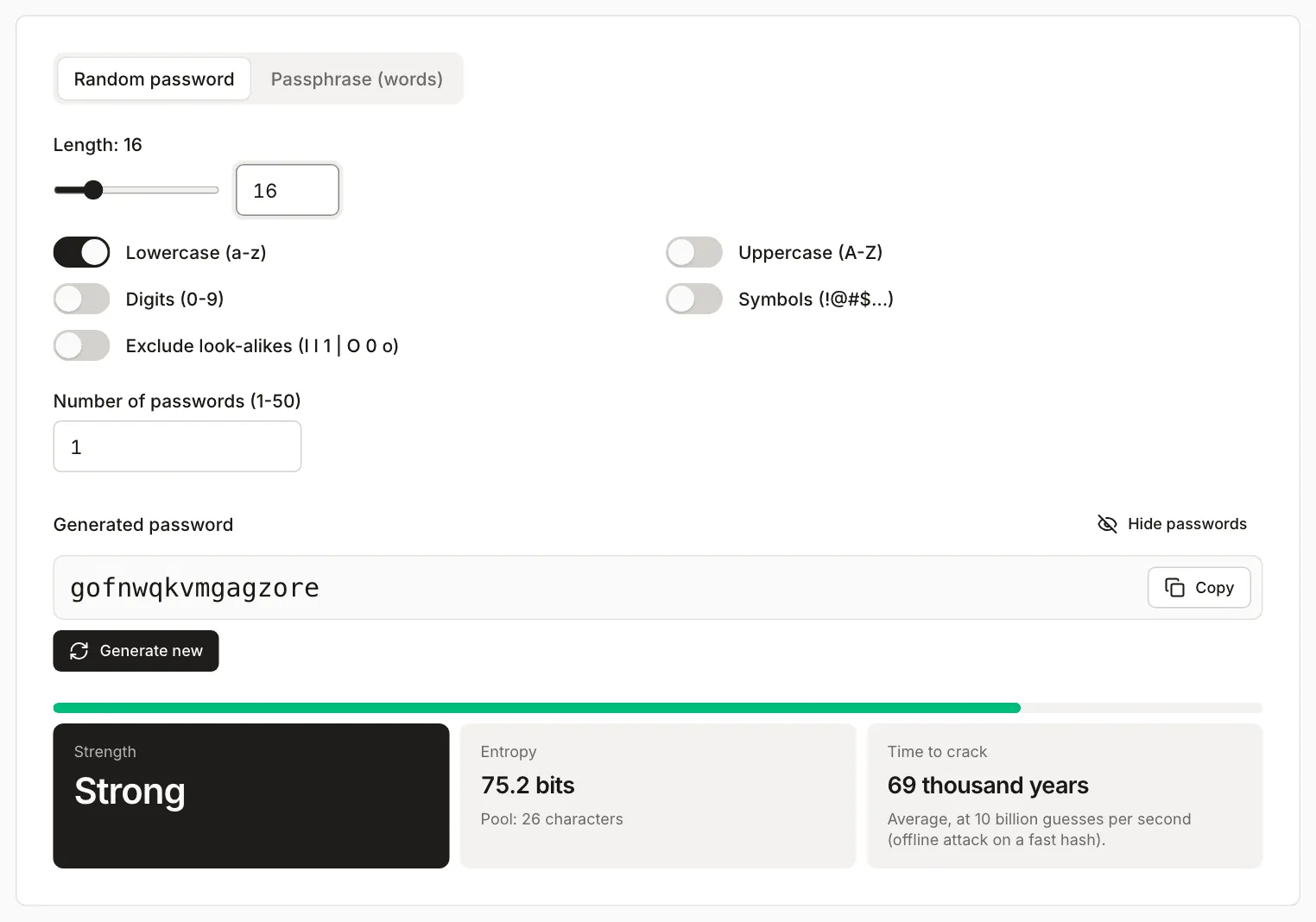
The password in the screenshot is an example from our test. Do not use it.
In practice:
- If a form rejects some symbols, do not hunt for the ones it accepts. Make the password longer and keep letters and digits: 16 such characters give 95.2 bits.
- If a service caps the length, set the maximum it accepts. NIST says services should allow at least 64 characters.
- Extra character sets do no harm in a generator, because every character is random. Substitutions you make by hand are different: NCSC says swapping letters for lookalike digits does not strengthen a password, because the trick is well known.
A passphrase, when you have to remember it
“Passphrase (words)” mode picks words from a built-in list. You can choose 3 to 12 words (7 by default) and a separator: hyphen, dot, underscore, space or none. The English list has 378 words, so each word adds log2(378) = 8.6 bits. The tool computes bits = words × log2(378). The “Add a digit” option appends a digit to a random word and adds log2(10 × number of words) bits, which is 6.1 bits for 7 words. Capitalising words and the separator are fixed, so they add no bits.
| Settings | Entropy in the tool (bits) | Strength | Time to crack |
|---|---|---|---|
| 4 words | 34.2 | Weak | 1 s |
| 5 words | 42.8 | Fair | 6 min |
| 6 words | 51.4 | Fair | 2 days |
| 7 words with a digit (default) | 66.1 | Strong | 122 years |
From a Node calculation: 8 words with a digit give 74.8 bits, and 12 words without a digit give 102.8 bits, which is “Very strong”. For the main password of a password manager, take more words than the default 7.
NCSC advises three random words. The number of words alone does not set the strength, because the size of the word list matters too. With this tool’s list, three words are only 25.7 bits, which is less than 6 random lowercase letters (28.2 bits). So do not copy the number “three”: check the entropy in the tool and pick the word count from that. The word list is part of the page’s code, so the formula assumes the attacker knows it.
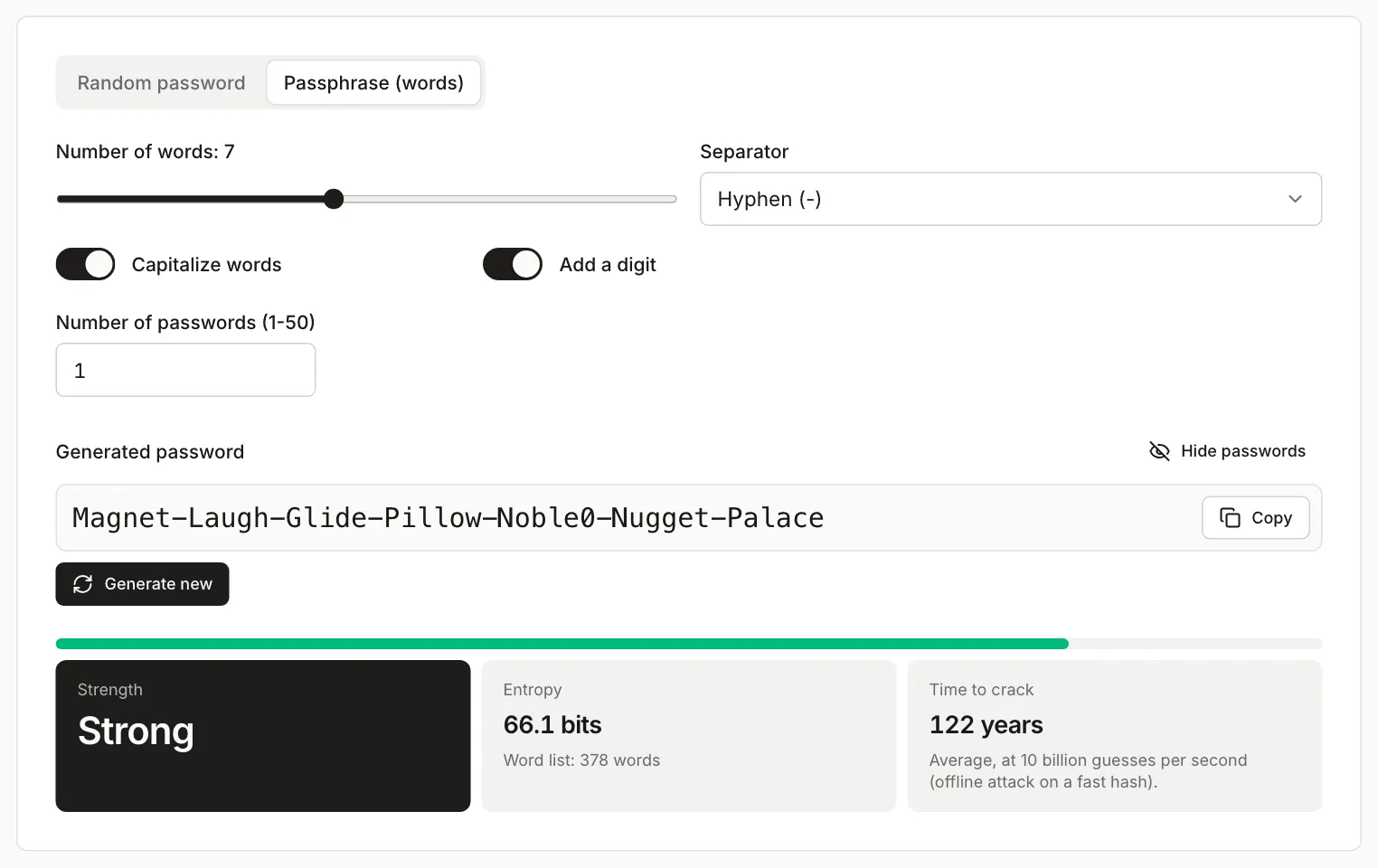
The phrase in the screenshot is an example from our test. Do not use it. The generator has to choose the words. NCSC warns against names, dates and favourite teams, and a phrase of your own such as “MyDogRex2026” does not have the entropy in the table.
Where the generator gets its randomness
This is how the Password Generator code (the logic.ts file) works:
- Random numbers come from
crypto.getRandomValues(), the browser’s cryptographic random generator. The buffer holds 256 32-bit numbers.Math.random()is not used. - Index selection uses rejection sampling: values from the incomplete final block of the 2^32 range are discarded and redrawn. The naive
random % Nwith N = 90 would make 76 of the 90 characters come up once more in about 47.7 million draws (a difference of roughly 2 in 100 million). With a 32-bit source that flaw would be purely theoretical, but the code does not have it: rejection sampling is applied to picking characters and words. - Passwords are created in the browser, are not sent to a server and are not saved. They disappear when you close the tab.
With several character sets, the generator draws a whole string from one pool and discards results that lack any selected set. That makes every allowed password equally likely, so the tool shows the exact entropy: log2 of the number of passwords that contain a character from every set.
Password manager, 2FA and unique passwords
The strongest password does not help if it is reused across many services or typed into a fake site. The sources above agree on three things:
- Every account gets its own password, so a breach at one service does not open the others (NCSC).
- A password manager generates and stores the passwords and fills them only on the right site, which makes phishing harder. NCSC advises protecting its main password with two-step verification. Source: NCSC (checked in October 2026).
- Turn on two-step verification wherever it is offered. NCSC calls it the most important first step, with unique passwords adding more protection. Where passkeys are available, NCSC recommends them.
For the generator, that means: for accounts kept in a manager, generate random passwords of 16 or more characters. Build the manager’s main password and your computer’s password from random words, since you will type those from memory.
NIST advises against periodic password changes. Change a password after a breach, after a suspected intrusion, or if someone has seen it.
Limits
- The entropy from the tool applies to passwords the tool generated. A password retyped from memory, edited after generation or “inspired” by a generated one has a different, usually much lower value.
- Time to crack assumes a fast hash and 10 billion guesses per second. It depends on how the service stores passwords, which the tool cannot see.
- Length does not protect against phishing, spyware, or a service that stored your password in plain text.
- The length slider stops at 64, but you can type up to 128 characters in the box next to it. A passphrase has 3 to 12 words.
- A service that limits the length or the character set may force a shorter password than recommended. In that case set the maximum length it allows.