Images & graphics
Favicon sizes for a website: which files you actually need
A handful of files made from one square logo covers browser tabs, iPhones and Android. This guide shows which ones you need, what Google requires for favicons in search results, and why an icon sometimes refuses to change.
- HNarzędzia editorial team
- Published:
A browser shows your favicon on the tab, in bookmarks and in history, and Google can show it next to your result in search. One file is often enough for the tab, but iPhones look for a separate home screen icon, and Chrome wants 192 and 512 px icons before it will install a site as an app. You can make the full set from one logo in the favicon generator, in your browser, without uploading the logo anywhere.
Which files you need
| File | Size | Used for | Do you need it? |
|---|---|---|---|
favicon.ico |
16, 32 and 48 px in one file | browser tab, bookmarks, Google | yes, in the site root |
favicon-32x32.png, favicon-16x16.png |
32 and 16 px | browser tab | usually, they are part of the generated code |
apple-touch-icon.png |
180 px | the site’s icon on an iPhone or iPad home screen | yes, if anyone might add your site to their home screen |
android-chrome-192x192.png, android-chrome-512x512.png |
192 and 512 px | manifest icons, installing the site as an app | only with a manifest or a PWA |
site.webmanifest |
text file | app name and icons | only with a PWA |
Browsers request /favicon.ico from the site root even when your HTML has no link for it, and Apple likewise looks for /apple-touch-icon.png. Explicit links protect you if those habits change (MDN, the link element, checked October 2026). The 192 and 512 px requirement applies to Chromium: web.dev (last updated 18 September 2024, checked October 2026) says a manifest must have both, and that if you supply only those two, Chrome scales them to fit the device.
The generator does not make an SVG file. If you add your own favicon.svg, keep the ICO and PNG links as well: the browser picks the best matching link and moves on to the next one if it can’t use a format (MDN, the rel attribute). Google does not list SVG among its supported favicon formats (details below).
HTML to paste
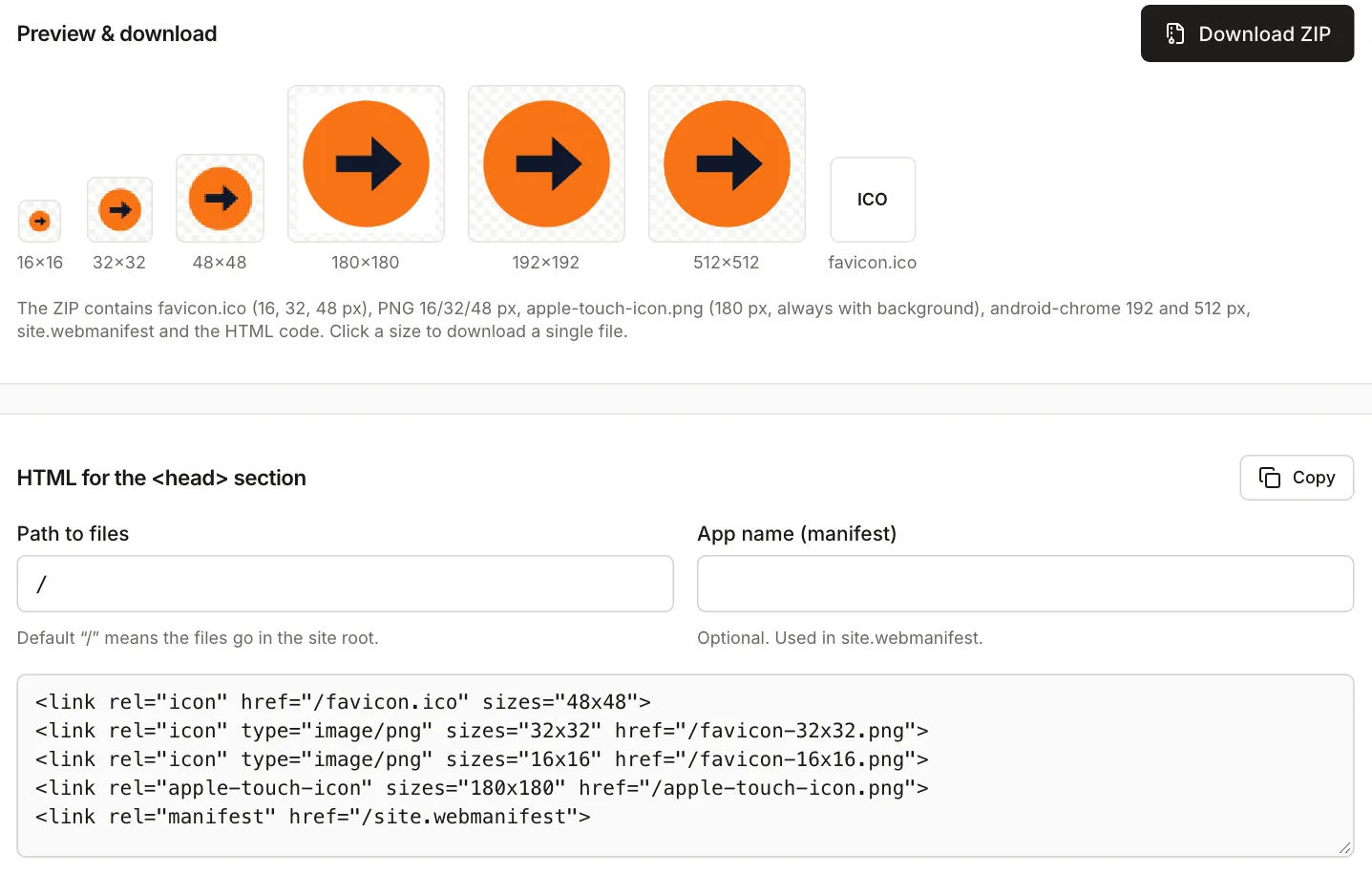
The generator gives you the same code in the box on the page and in a text file inside the ZIP. For files in the site root it looks like this:
<link rel="icon" href="/favicon.ico" sizes="48x48">
<link rel="icon" type="image/png" sizes="32x32" href="/favicon-32x32.png">
<link rel="icon" type="image/png" sizes="16x16" href="/favicon-16x16.png">
<link rel="apple-touch-icon" sizes="180x180" href="/apple-touch-icon.png">
<link rel="manifest" href="/site.webmanifest">
Paste it into the <head> of your home page and upload the files from the ZIP to the root of your server. If they live in a subfolder, enter it in “Path to files”, starting with a slash, for example /icons. Without the leading slash (icons) the addresses in the code are relative, so the browser looks for them next to whatever page it is on, and nested pages return a 404.
Fill in “App name (manifest)” if you use the manifest. With the field empty, the manifest has no name and the browser falls back to the site address. The short name under the icon is at most 12 characters and is cut at a word boundary (for example “Kolibri Studio Online” becomes “Kolibri”), so edit it by hand if you want something else. The generated manifest holds the name, start_url, icons, colours and display, which are the members MDN lists for installing a site in Chromium (MDN, installable PWAs, modified 6 October 2026).
What comes out of the ZIP
We generated a set from a synthetic logo drawn in SVG: an orange circle with a navy arrow on a transparent background, 512×512 px. The tool ran in Chromium with the default settings (whole image, 0% padding, transparent background), and we measured the files from the ZIP in Node.
| File | Dimensions | Size |
|---|---|---|
favicon-16x16.png |
16×16 px | 511 B |
favicon-32x32.png |
32×32 px | 1,006 B |
favicon-48x48.png |
48×48 px | 1,802 B |
favicon.ico |
16, 32 and 48 px (PNG images inside) | 3,373 B |
apple-touch-icon.png |
180×180 px | 6,759 B |
android-chrome-192x192.png |
192×192 px | 7,926 B |
android-chrome-512x512.png |
512×512 px | 20,664 B |
site.webmanifest |
345 B | |
| HTML code file | 323 B |
The whole ZIP is 43,755 B because the tool does not compress the files. The ICO is simply three PNGs with a header, so its size is the three PNG sizes plus 54 bytes of header. The HTML file is named favicon-html.txt in the English interface and kod-html-favicon.txt in the Polish one. Its content is identical to the box on the page, and the manifest points to both Android icons under /.
With these settings the corner pixel of apple-touch-icon.png is opaque white (255, 255, 255, 255), while the corner of every other PNG is fully transparent. The tool always gives this icon a background (white, or the colour you pick) because, according to its own description, iOS would turn transparency into black, and it leaves the corners square. The corner radius setting affects the other icons.
Preparing the artwork
The generator takes PNG, JPG, WebP and SVG, and its hint recommends a square of at least 512×512 px. A smaller image gets enlarged and the big icons turn out soft. The 512 px icon is rendered straight from your source, and the smaller ones are scaled down in steps.
What matters most is how much of the logo survives at 16 px. We tried five versions of the same logo and measured the box taken by the visible content of each icon (pixels with alpha above 32):
| Source and setting | Content in the 16 px icon | in 32 px | in 48 px |
|---|---|---|---|
| symbol only, padding 0% | 16×16 | 30×30 | 46×46 |
| symbol only, padding 10% | 12×12 | 24×24 | 36×36 |
| symbol cut from the wide logo (533×533 px) | 12×12 | 23×22 | 35×34 |
| wide logo 1600×533 px, “Whole image” | 13×4 | 25×8 | 37×12 |
| wide logo, “Crop to square” | 16×8, only the middle of the name | 32×16 | 48×24 |
At 16 px the wide logo with its name is a strip 13×4 pixels, which is just a smudge. Cropping to a square makes the letters larger but cuts off the symbol and the ends of the name. For a favicon, use the symbol alone, or one or two letters.

What follows from the measurements and the tool’s own description:
- Use a square and simplify the logo. At 16 px, shape and contrast matter, and detail does not.
- Padding (0-25% on each side) takes pixels from small icons. At 10% the logo is 12 pixels wide at 16 px instead of 16, so add it only when the logo touches the edges. A symbol that already has its own shape, such as a circle or a square, often needs none.
- A transparent background keeps the icon light, but a dark symbol disappears on a dark tab bar. If your logo is dark only, turn on a coloured background in the settings.
- You don’t need a separate file with a background for the Apple icon. The generator adds one.
When the logo isn’t square, or isn’t a PNG
Three tools help you prepare the square:
- Crop image cuts the symbol out of a larger PNG. For the 1600×533 px wide logo we set the ratio to 1:1 with X=0, Y=0 and width 533, and got a 533×533 px PNG (19,020 B) with transparency preserved. “Crop to square” inside the generator always takes the centre of the image, so it won’t help when the symbol sits at one side.
- SVG to PNG makes a PNG when a form or CMS won’t take SVG. For an SVG with no
widthandheightattributes (only aviewBox) we set the width to 512 px and got a 512×512 px PNG of 20,664 B. In Chromium that file is byte-for-byte identical to the generator’sandroid-chrome-512x512.png. The generator reads SVG directly, so you don’t need this step for it, and the viewBox-only SVG produced the same set of files. - Image resizer is for a size the generator doesn’t make. From the square 533×533 px PNG we made a 96×96 px version (3,134 B) by entering a width of 96 px with the aspect ratio kept. The basic set doesn’t need it.
Favicons in Google results
Google lists its requirements on Define a favicon to show in search results (updated 28 August 2026, checked October 2026). The main points:
- A
<link>withrel="icon"(shortcut icon,apple-touch-iconandapple-touch-icon-precomposedare also accepted) must be in the header of your home page. The URL can be relative or absolute, and can point to a CDN. - The favicon must be square and at least 8×8 px. Google recommends going larger than 48×48 px so it looks good on different surfaces. The “multiple of 48 px” rule found in older guides is not in the current documentation.
- Supported formats are BMP, GIF, ICO, PNG, JPEG, PPM and TIFF. SVG is not on the list.
- The file’s URL should be stable, and Googlebot-Image must be able to fetch it (Googlebot needs access to the home page). Don’t block either in
robots.txt. - Google supports one favicon per hostname. A domain and a subdomain can each have its own, a subdirectory (
example.com/news) can’t. - A change can take from several days to several weeks to appear. You can ask for your home page to be indexed with the URL Inspection tool in Search Console.
- Google doesn’t guarantee a favicon will appear even if you meet every requirement, and it replaces icons it considers inappropriate.
The generator’s files meet the format (ICO and PNG) and shape requirements. The largest image inside favicon.ico is 48 px, though, which is not “larger than 48”. If you want to hand Google a bigger icon, you can add one more line pointing to a file from the ZIP:
<link rel="icon" type="image/png" sizes="192x192" href="/android-chrome-192x192.png">The documentation doesn’t say which of several links Google picks, so this is an extra, not a guarantee. The generator doesn’t add this line.
Common problems
The icon doesn’t change after uploading a new one
Browsers keep favicons in cache for a long time. First check that https://yourdomain.com/favicon.ico opens the new file. Then reload the page bypassing the cache, or open it in a private window. A query string (/favicon.ico?v=2) helps the browser but changes the file’s URL, and Google wants a stable one, so use it sparingly. In Google results the change takes longer than in a browser.
A 404, or the icon only shows on the home page
Addresses in your code without a leading / are resolved from the current page. Use absolute paths from the site root, and open every file from the code in a separate tab. Each should display, not return an error. You can inspect the manifest and icons of an installed app in the Application panel of Chrome DevTools.
The iPhone icon has an odd background
Check that your code points to the generator’s apple-touch-icon.png. As above, that file always has a background. If you uploaded your own file with transparency, replace it with the one from the ZIP, because according to the tool’s description iOS fills transparency with black.
The logo is unreadable on the tab
Go back to the artwork: simplify the logo or cut out the symbol instead of shrinking a horizontal wordmark.
Google still shows an old or default icon
Check that robots.txt doesn’t block the file, that the link is on the home page, and that the file is in a supported format. Then wait for Google to recrawl.