Images & graphics
EAN barcode for your product: what you can generate yourself and what must come from GS1
A shop or marketplace asks for an EAN barcode, and a generator will draw one from any valid number. Those are two separate things: a number that has an owner, and a picture of bars. This guide shows what you can do yourself and what has to come from GS1.
- HNarzędzia editorial team
- Published:
An EAN barcode on a package is a number plus a picture of that number. The barcode generator draws the picture from whatever valid number you give it. It does not issue numbers and it does not look anything up in GS1’s database. If you sell a product through shops or marketplaces, the number must come from GS1, so a clean image of an invented number solves nothing.
The number and the picture are different things
GS1 Poland puts it in one line: EAN is the bars, GTIN is the digits. EAN is one of the GS1 barcode types that carries a GTIN (Global Trade Item Number), and the GTIN identifies a product worldwide. People use the two words interchangeably, but the same number can also be printed in other symbologies, such as ITF-14 on cartons (GS1 Poland FAQ, in Polish, checked October 2026).
| GTIN (the number) | Barcode image | |
|---|---|---|
| What it is | digits that identify a product | those digits drawn as bars |
| Who makes it | GS1 licenses a block of numbers to your company | you, in a generator or a design program |
| What the generator does | calculates or verifies the check digit, hints at what the prefix means | draws the code and saves it as SVG or PNG |
The prefix hint is based only on the first three digits. Prefix 590, for example, is reported as a GS1 Poland number, but the tool cannot tell whether anyone was actually given that number. The starting value in the tool (590123412345) is a placeholder, so do not put it on a product.
When an internal code is enough and when you need GS1
What matters is who has to read the code. If the data stays inside your company, you can use your own numbers. If a stranger’s system has to recognise the product, you need a number that nobody else will ever use.
| Situation | What to do |
|---|---|
| Warehouse locations, serial numbers, document numbers, stocktaking | Code 128 with your own text or number. No GS1 needed. |
| Your own shop or till, goods weighed in store, loyalty cards | An internal number, for example EAN-13 with prefix 200-299. It works only inside your own environment. |
| Your own product sold through shops, retail chains and marketplaces | A GTIN from GS1. |
| You resell someone else’s branded product that already has an EAN on the pack | Use the manufacturer’s number. Do not assign your own. |
| A book or a periodical (prefixes 978, 979 and 977) | ISBN or ISSN from the relevant agency, not a number from your company’s GS1 block. |
Code 128 is a general barcode standard (ISO/IEC 15417). GS1-128 is a subset of it, used for GS1 identifiers (GS1 General Specifications, release 26.0, January 2026, checked October 2026). The generator makes plain Code 128 without the GS1 elements, which is right for your own labels. It accepts ASCII characters (no accented letters) and up to 80 characters of text. Code 39 takes only capital letters, digits and a few symbols.
GS1 reserves EAN-13 prefixes 20-29, meaning numbers that start with 200-299, for Restricted Circulation Numbers. The specification says these must not be used globally or in open environments, and that they are never unique outside the restricted environment they were meant for. Each national GS1 organisation defines the exact scope of the 20-29 range, so if you want to use such numbers beyond a single till, ask your local GS1 office about its rules (source as above). The generator flags these numbers as internal-use numbers.
The catch with an internal code is that it does not travel. Once you start selling through a marketplace or a retailer, you will have to assign GTINs to your products and change the labels.
What GS1 and the marketplaces say
GS1 Poland says that sellers on Allegro, Empik, Amazon, eBay or Alibaba need a unique GTIN, and that Allegro and Amazon may ask for the GS1 membership certificate (GS1 Poland, order a GTIN, in Polish, checked October 2026). GS1 Australia says Amazon verifies product identifiers against GS1 and that GS1-issued numbers avoid rejections and removals (GS1 Australia, barcodes for Amazon, checked October 2026). These are statements by GS1 organisations, not marketplace rules. Each platform changes its requirements on its own schedule, so read its current seller help pages.
The same GS1 Poland FAQ describes the allocation rules. A trade item must have a GTIN before it is offered for sale, and a number once assigned must never be given to any other product. A distributor, importer or retailer must not assign a different number to an item that already has one, unless the item has changed enough to need a new GTIN.
How to get a GTIN from GS1
GS1 Poland describes the process like this (source: order a GTIN, in Polish, checked October 2026). Other countries have their own GS1 organisations with their own procedures and prices.
- Count your products. Every feature that distinguishes one product from another needs its own number: colour, flavour, size, packaging.
- Fill in the application (it asks for details such as tax number and company revenue) and pay. Registration takes up to 3 working days after the application and the payment.
- Log in to the MojeGS1 platform and assign the numbers to your products.
- Download the participation certificate if a platform asks for it.
The fee depends on the size of the block and on company revenue. GS1 Poland gives one example on that page: a block of 10 numbers for a company with revenue under PLN 2 million net costs PLN 136 gross per year. The annual fee is paid every 12 months, and without it you cannot use the numbers.
GS1 Poland does not sell the picture itself. It says barcodes are drawn in graphic programs or in MojeGS1, so once you have your number you can draw the code in the generator. Products too small for EAN-13 need a separate agreement for an EAN-8 code (described on the same page).
Worked example: a test number and its barcode
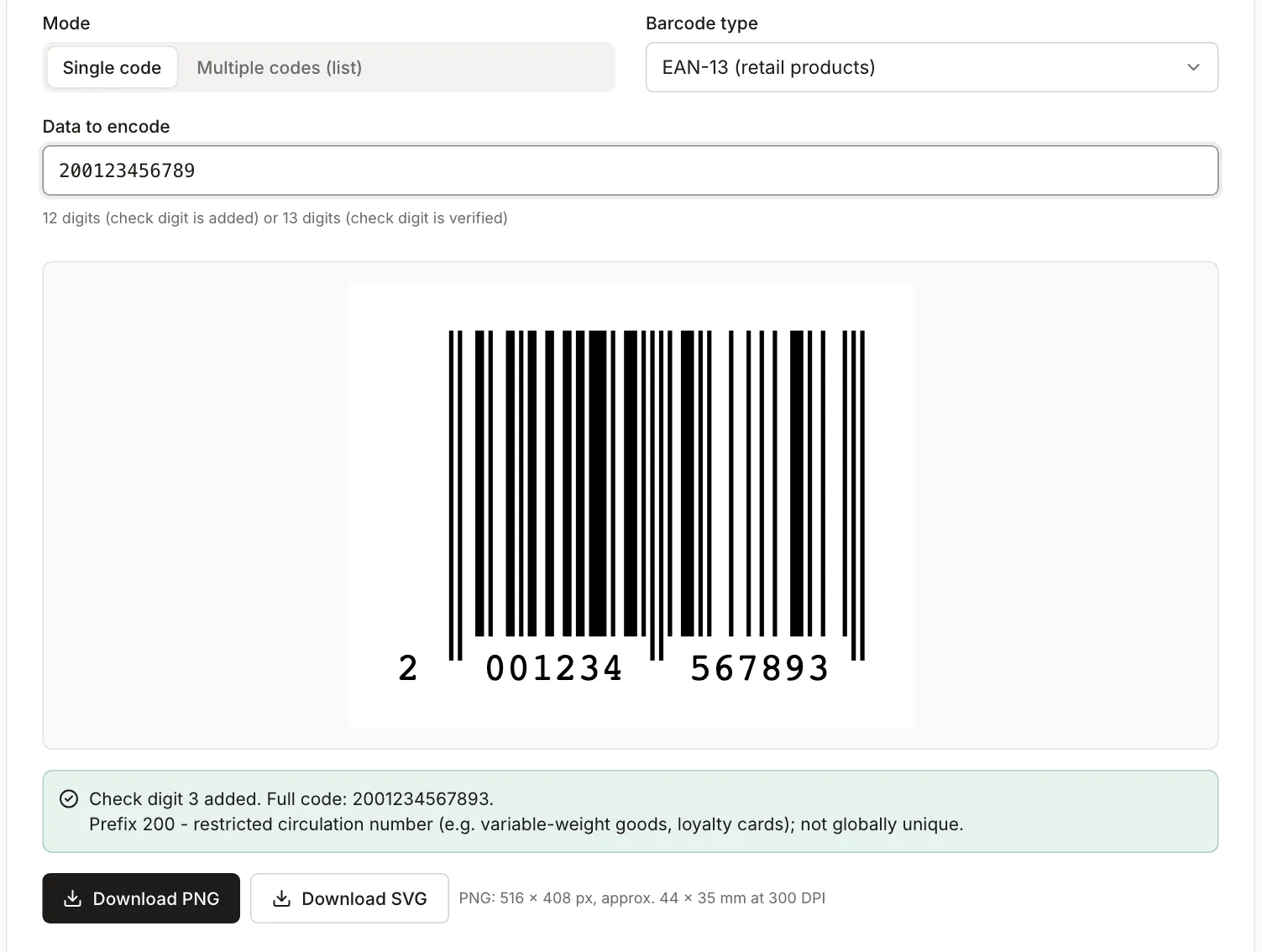
The measurements below use the test number 200123456789. Prefix 200 is in the internal-use range, so the number belongs to no company and must not go on a product for sale. A real generator running in Chromium produced the files, and we measured them after download. The full procedure is in scripts/guide-fixtures/ean-barcode-for-products.mjs.
The check digit
The last digit of an EAN-13 catches typing mistakes. It is calculated from the other 12 digits: starting from the right, multiply them alternately by 3 and 1, add the results, and take the number needed to reach the next multiple of 10. For 200123456789 the sum is 97, so the check digit is 3. The generator does this for you. Given 12 digits, it appends the missing digit (full code: 2001234567893). Given 13 digits, it verifies the last one.
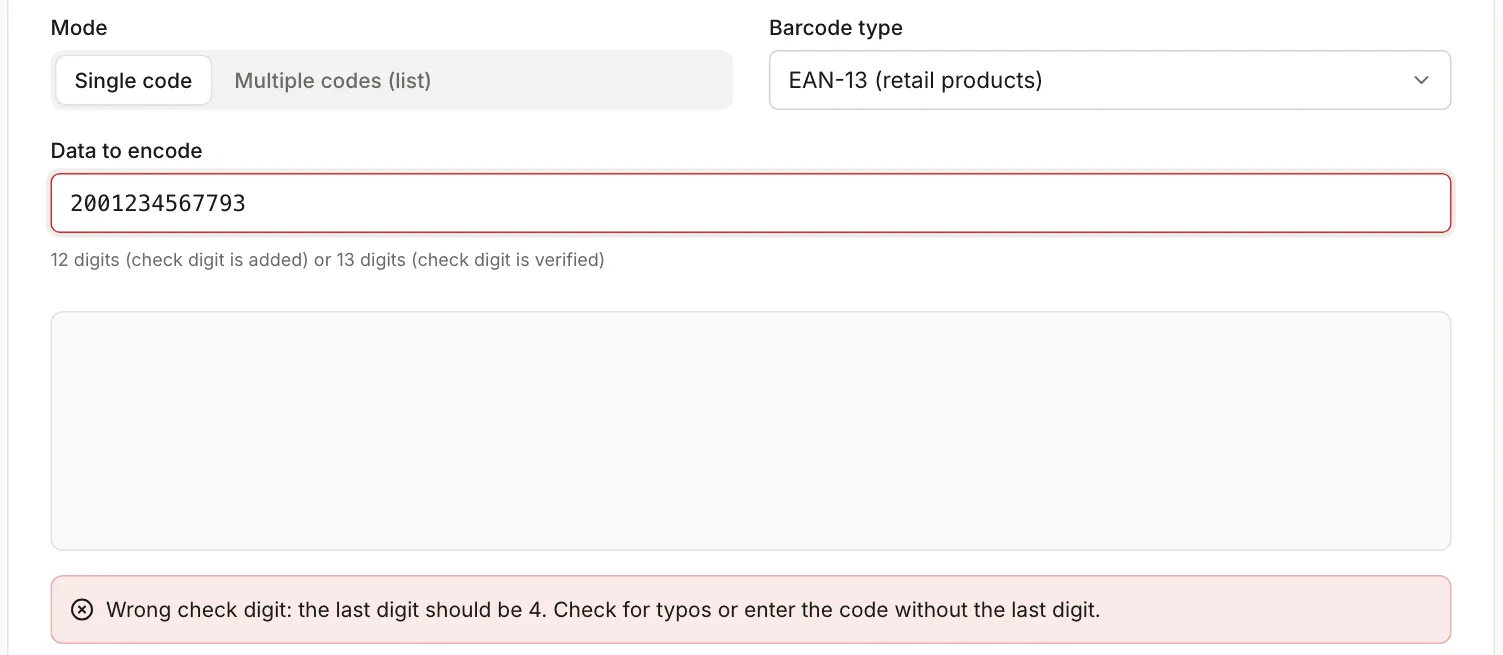
If the digit is wrong, the tool does not draw anything. For 2001234567793 (one digit changed), it says the last digit should be 4, and the “Download PNG” and “Download SVG” buttons are disabled.
The check digit catches a single wrong digit, but not every swap. Swapping neighbouring digits that differ by 5 gives the same result: 2701234567892 and 7201234567892 both have a valid check digit. A valid check digit also does not mean the number has been issued to anyone. It is only an arithmetic check.
File dimensions
All files were made with the default settings: module (narrowest bar) 2 px, margin 22 px, bar height 140 px, text below the code on, PNG at 2×. File sizes are in KB of 1000 bytes.
| File | Dimensions | Size |
|---|---|---|
| EAN-13 2001234567893, PNG 1× | 258×204 px | 5.1 KB |
| EAN-13, PNG 2× (default) | 516×408 px | 12.9 KB |
| EAN-13, PNG 4× | 1032×816 px | 33.7 KB |
| EAN-13, SVG | 258×204 px | 2.4 KB |
| Code 128 “MAG-A-03-12”, PNG 2× | 712×408 px | 13.3 KB |
| Code 128 “MAG-A-03-12”, SVG | 356×204 px | 2.3 KB |
For the default 2× PNG (labelled “2× (print, 300 DPI)”) the tool states “approx. 44 × 35 mm at 300 DPI”, and for the Code 128 file “approx. 60 × 35 mm”. The SVG dimensions are given in pixels, but as a vector it scales to any size without losing sharpness.
Size, quiet zone and colours for printing
From the GS1 General Specifications (release 26.0, January 2026, checked October 2026), for EAN-13 at retail:
- Module: 0.264 to 0.660 mm, with a nominal value of 0.330 mm (scaling from 80% to 200%).
- Quiet zone, the blank margin at the sides of the bars: 11 modules on the left and 7 on the right.
- Bar height, not counting the text: at least about 69 modules (18.28 mm at a 0.264 mm module and 22.85 mm at 0.330 mm). The specification says the bars must not be truncated below this.
Quiet zone
The tool’s default margin is 22 px at a 2 px module, which is 11 modules on each side (top and bottom get 22 px too). With the text switched on, EAN-13 also has 12 modules of blank space on the left for the first digit, so the left quiet zone is larger than the minimum. We checked what happens with smaller margins. The 1× PNGs (bar height 140 px) were read with the ZXing 0.21.3 library in Node, also after placing them on a dark (#303030) background:
| Margin | PNG size | ZXing read |
|---|---|---|
| 0 px | 214×160 px | not read |
| 4 px (2 modules) | 222×168 px | not read |
| 8 px (4 modules) | 230×176 px | read |
| 14 px (7 modules) | 242×188 px | read |
| 22 px (11 modules, default) | 258×204 px | read |
This is the result of one decoder, and a till scanner may be less forgiving. It does show that a zero or very small margin breaks reading even in software. Keep the margin at or above the specification values and do not crop the image tight against the bars. If the code goes on a label with a border or a dark edge, leave a light area around the bars.
Bar height
The default 140 px at a 2 px module is 70 modules, which matches the GS1 minimum for EAN-13 at retail (about 69). The 1× PNG is then 258×204 px, and ZXing reads it. If you shorten the bars with the slider, they will be shorter than the specification requires. That may be enough for internal codes scanned in a warehouse, but test them with your own scanner.
Scale and printing
For print, choose SVG and set its size in your design program so that the narrowest bar is between 0.264 and 0.660 mm. The default 2× PNG (labelled “2× (print, 300 DPI)”) has a 4 px module, which at 300 DPI is about 0.34 mm, close to nominal. The 8 px module of the 4× PNG is about 0.68 mm, just above the 0.660 mm upper limit, so place that file at about 50% scale.
Colours
Bars must be darker than the background, with strong contrast. The generator warns when the bars are lighter than the background or the contrast is too low. In our test, white bars on a black background were not read by ZXing. Grey bars (#999999) on white were read by ZXing, but the tool warns about such contrast because a laser scanner may fail on it. Keep the transparent background for design work: a finished label needs a light area behind the code.
Testing that the code reads
Scanning with a phone or a basic reader only confirms that the code can be decoded. GS1 Poland points out that an ordinary reader is not enough to judge print quality, which is assessed on sample packaging or artwork with dedicated verifiers (GS1 Poland, code verification, in Polish, checked October 2026). Participants can have their first two codes of the year checked free of charge (FAQ).
A practical routine:
- Print the code at its final size on the final material (label, carton, film).
- Scan it with the reader the recipient will use, or with a few phone apps.
- Compare the number that was read with the one you entered, digit by digit.
- For a large print run, order a quality verification.
In our measurement, ZXing read EAN-13 2001234567893 from the generator’s 1×, 2× and 4× PNG files, and Code 128 “MAG-A-03-12”. That is a Node measurement on files from the generator, not a test on a till scanner.
What about a QR code instead of EAN?
The QR code generator stores text, a link or contact details, and it does not replace the GTIN at a till. GS1 Poland describes a gradual move to GS1 2D codes at checkouts: under the “Sunrise 2027” initiative, retailers have committed to being ready by the end of 2027, and both kinds of codes are meant to coexist until then (GS1 Poland, barcodes enter a new era, in Polish, checked October 2026). The QR generator on this site has no GS1 mode, and under the GS1 specification, restricted circulation numbers (such as prefix 200-299) cannot be encoded in 2D codes.
Related guide
To prepare product photos for a shop listing, see How to prepare product photos for an online store.