Finance
Margin vs markup: how to set a selling price, net and gross with Polish VAT
If you buy a product for PLN 80 net, a 30% margin means a selling price of PLN 114.29 net, while a 30% markup gives PLN 104. The two use different bases: margin is a share of the selling price, markup a share of the cost. This guide covers the formulas, Polish VAT, working back from a gross price, discounts and rounding.
- HNarzędzia editorial team
- Published:
You want a 30% margin, so you add 30% to the purchase price. The result earns less than you planned. On a PLN 80 net purchase, a 30% margin means a net price of PLN 114.29, while adding 30% to the cost gives PLN 104. At PLN 104 the margin is 23.08%, so you make PLN 10.29 less on each unit.
The figures below come from the margin and markup calculator, the VAT calculator for Poland and the percentage calculator. The guide is written for people who run an online shop or a business in Poland and sell with Polish VAT (in Polish, podatek od towarów i usług). VAT rates were checked in October 2026, and the sources are at the end.
Margin and markup describe the same profit
Profit is the selling price minus the purchase cost. Margin and markup measure it against different amounts:
- margin = profit / selling price,
- markup = profit / purchase cost.
So the price comes from a different formula depending on which one you start with:
- from a margin: price = cost / (1 - margin),
- from a markup: price = cost × (1 + markup).
For a product bought at PLN 80 net:
| 30% margin | 30% markup | |
|---|---|---|
| Net selling price | PLN 114.29 (80 / 0.7) | PLN 104.00 (80 × 1.3) |
| Profit per unit | PLN 34.29 | PLN 24.00 |
| Margin | 30% | 23.08% |
| Markup | 42.86% | 30% |
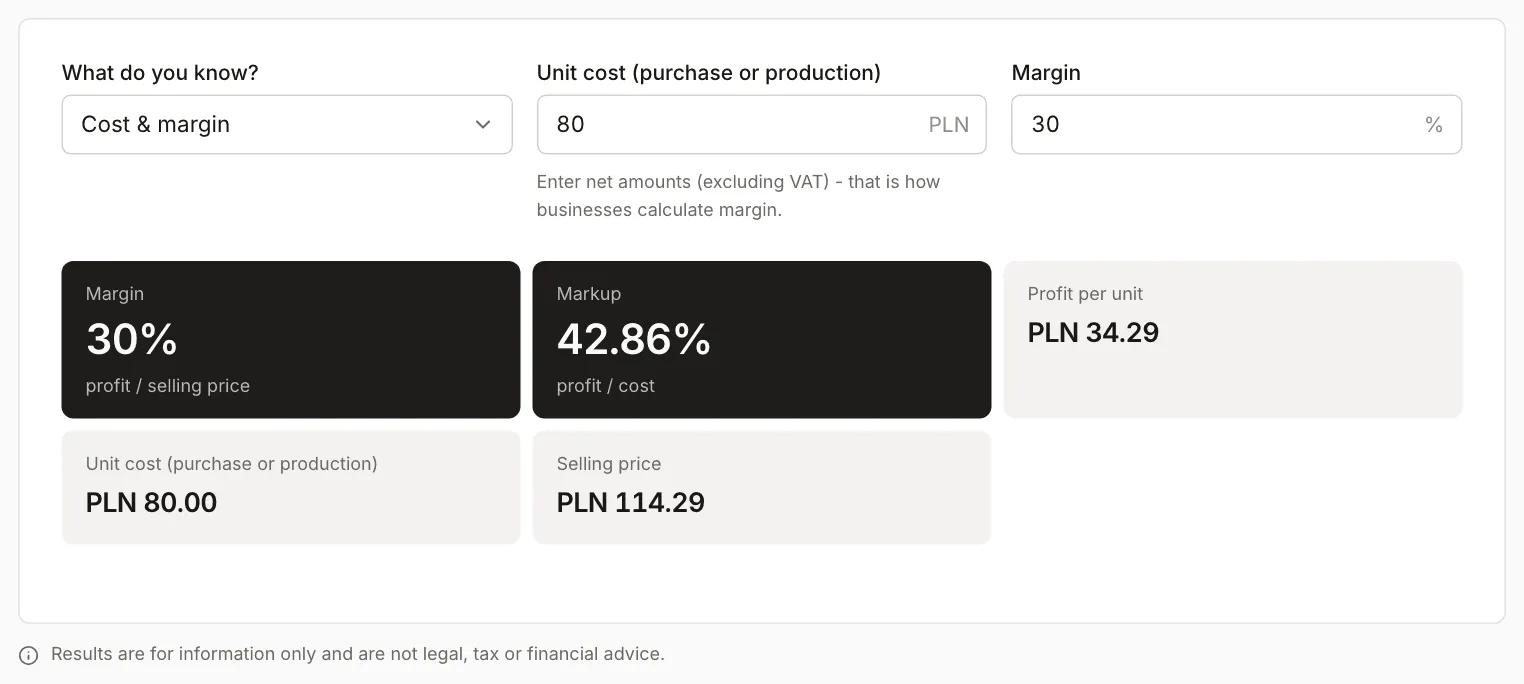
In the calculator you choose what you already know (“Cost & margin”, “Cost & markup”, “Cost & price” and two options that start from the price), and it fills in the rest. The same slip shows up with other numbers: adding 20% to PLN 80 gives PLN 96 and a 16.67% margin, not 20%.
Markup is always higher than margin (when profit is positive). You convert between them like this:
- markup = margin / (1 - margin),
- margin = markup / (1 + markup).
| Margin | Markup |
|---|---|
| 10% | 11.11% |
| 20% | 25% |
| 25% | 33.33% |
| 30% | 42.86% |
| 40% | 66.67% |
| 50% | 100% |
Margin never reaches 100%, because profit cannot exceed the price. Markup can: selling at twice the cost is a 100% markup and a 50% margin. In conversations with suppliers the word “margin” is sometimes used for both, so when you compare rates, check which amount they are calculated on.
Gross price: add VAT to the net price
Margin and markup are calculated on net prices. For a seller who is an active VAT taxpayer, the VAT charged is not income, because it goes to the tax office. You get the gross price by multiplying the net price by (1 + rate). Poland has four rates:
| Rate | What it applies to (examples) |
|---|---|
| 23% | standard rate, most goods and services |
| 8% | goods and services listed in Annex 3 to the VAT Act, some catering services, housing covered by the social housing programme |
| 5% | goods listed in Annex 10, including some foods and books |
| 0% | among others exports of goods and intra-EU supplies of goods, if you meet the conditions |
The Act itself sets the standard rate at 22% and the reduced rate at 7% (Art. 41 paras 1 and 2). Transitional provisions (Art. 146ef) raise them to 23% and 8%, and that is the position in 2026. The Minister of Finance is to announce the end of those rates in the Official Gazette (Monitor Polski). The rate depends on the product, not on the seller. If you are unsure, you can apply for binding rate information (WIS, Art. 42a of the Act).
The same net price of PLN 114.29 (from a 30% margin) looks like this at each rate:
| Rate | Net | VAT | Gross |
|---|---|---|---|
| 23% | PLN 114.29 | PLN 26.29 | PLN 140.58 |
| 8% | PLN 114.29 | PLN 9.14 | PLN 123.43 |
| 5% | PLN 114.29 | PLN 5.71 | PLN 120.00 |
| 0% | PLN 114.29 | PLN 0.00 | PLN 114.29 |
The margin on the net price is 30% every time. Only the shelf price changes. If the rate changes and the gross price has to stay the same, the net price changes, and the margin changes with it.
For the price with a 30% markup (PLN 104 net), 23% VAT adds PLN 23.92, so the gross price is PLN 127.92.
This setup assumes you deduct the VAT on your purchases. If you sell without VAT (for example under the exemption for small businesses), you usually cannot deduct the VAT on the purchase invoice, so it becomes part of your cost. Settle how to calculate that with your accountant.
From a gross price to net and margin
Often you have to start from the shelf price. Take a product on sale at PLN 199 gross (VAT 23%) that you buy for PLN 120 net.
- Net = 199 / 1.23 = PLN 161.79, and VAT is PLN 37.21.
- Profit = 161.79 - 120 = PLN 41.79.
- Margin = 41.79 / 161.79 = 25.83%, markup = 41.79 / 120 = 34.82%.
Two shortcuts give the wrong answer. Taking 23% off 199 gives PLN 153.23 and a margin of 21.69%, because 23% is calculated on the net price, not the gross one. The VAT inside the PLN 199 is PLN 37.21, which is 18.70% of the gross amount. And calculating the margin on PLN 199 as if it were net gives 39.70%, almost 14 percentage points too high.
The rate decides the result. The same PLN 199 gross price and PLN 120 net cost:
| Rate | Net | VAT | Margin |
|---|---|---|---|
| 23% | PLN 161.79 | PLN 37.21 | 25.83% |
| 8% | PLN 184.26 | PLN 14.74 | 34.87% |
| 5% | PLN 189.52 | PLN 9.48 | 36.68% |
| 0% | PLN 199.00 | PLN 0.00 | 39.70% |
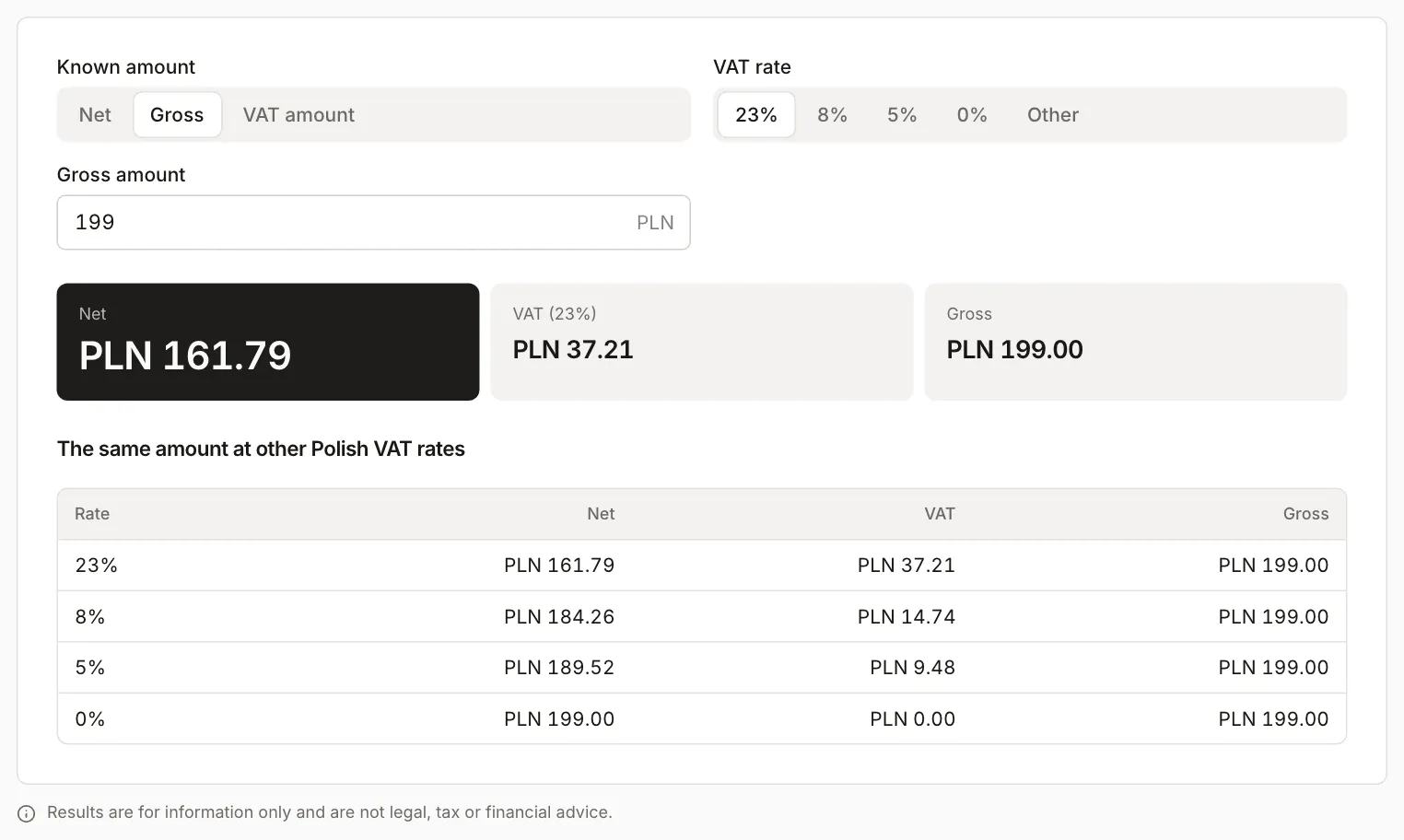
In the VAT calculator choose “Gross”, enter the amount and the rate. The table under the result shows the same amount at the other rates.
Discount and margin
A discount comes off the price, so it cuts profit zloty for zloty, and the margin percentage falls by more than the discount suggests. Take a product with a 30% margin (PLN 114.29 net, profit PLN 34.29):
- a 10% discount is PLN 11.43, so the price falls to PLN 102.86,
- profit falls to PLN 22.86, which is a third less,
- the margin falls from 30% to 22.22%.
To keep the same total profit as before the discount, you have to sell half as many units again (34.29 / 22.86 = 1.5). The discount that wipes out profit equals the margin: at a 30% margin, a discount of about 30% brings the price down to the cost, PLN 80.
With a 30% markup (PLN 104 net), the same 10% discount gives a price of PLN 93.60, a profit of PLN 13.60 and a margin of 14.53%. The discount that wipes out profit here is 23.08%, which is the margin at that price.
A percentage discount taken off the gross price lowers the net price by the same percentage, so the margin moves the same way. For a discount given as a fixed amount off the gross price, convert it to net first: PLN 20 gross is PLN 16.26 net at 23% VAT. When you plan a promotion, choose “Cost & price” in the margin calculator, enter the price after the discount and read the new margin.
Rounding
A price from a margin rarely comes out in whole grosz (1/100 of a zloty). 80 / 0.7 is 114.2857…, so PLN 114.29. At that price the margin is exactly 30.0026%, and the calculator shows 30%.
VAT on an invoice is stated to the nearest grosz: fractions below 0.5 grosz are dropped and from 0.5 grosz rounded up (Art. 106e para. 11 of the VAT Act). From PLN 114.29 net you get PLN 26.2867, so VAT is PLN 26.29 and the gross price PLN 140.58. When it works from gross, the VAT calculator rounds the net amount first and takes VAT as the difference, which is why 161.79 + 37.21 gives exactly PLN 199.00. On an invoice with several lines, VAT can be shown per line or on the net total (Art. 106e para. 10), so the final grosze may differ depending on your invoicing software.
Rounding the shelf price changes the margin too. If you set PLN 139.99 gross instead of PLN 140.58, the net price drops to PLN 113.81, VAT is PLN 26.18 and the margin falls from 30% to 29.71%.
Round only the final price, and check the margin against that price.
What the calculators do not include
- Margin per unit is gross profit on the sale. The calculator does not subtract fixed costs such as rent or salaries. It works from the cost you enter: if you add shipping or a platform fee to it, the margin comes out lower.
- The calculator does not suggest what margin is right. That depends on your costs, turnover and competition.
- Trading margin is not the same as the VAT margin scheme (for example when selling second-hand goods), where tax is calculated on the difference between the selling and purchase price. The calculators do not apply that scheme.
- The results are indicative. The VAT rate for a specific product and the way to account for it are set by the law, and if in doubt, ask a tax adviser or apply for a WIS.
Sources (checked in October 2026)
- Act of 11 March 2004 on goods and services tax (VAT), consolidated text, Journal of Laws 2026 item 1263 (in Polish): Art. 41 (rates of 22%, 7%, 5% and 0%), Art. 42a (WIS), Art. 106e paras 10-11 (rounding of invoice amounts), Art. 146ef (rates of 23% and 8%), Annexes 3 and 10.
- VAT rates and limits on podatki.gov.pl, the Polish tax administration’s website (updated 15 December 2025, in Polish).