Video
How to make a GIF from a video without a huge file size
A GIF made from a few seconds of video can weigh several times more than the video itself. Here is why, which setting cuts the size the most, and when to skip GIF altogether.
- HNarzędzia editorial team
- Published:
On our synthetic test clip (1280×720, 15 s, an 8.4 MB MP4), a GIF made with 15 s, 15 fps and a width of 720 px (the tool’s maximum length and width) comes out at 25.1 MB. That is three times the size of the video it came from. The same footage cut to 5 s, at 10 fps and 480 px wide, fit into 2.3 MB.
Why GIFs are so heavy
An MP4 or WebM mostly stores what changed between frames and can skip anything that stayed still. In a GIF, the tool writes every frame in full, as a separate image compressed with LZW. At 10 fps and 5 s that is 50 complete images. At 15 fps and 15 s it is 225.
Color is the second cost. A GIF image is drawn from a color table, and the format allows at most 256 entries (GIF89a spec, W3C, checked October 2026). The tool builds one shared 256-color palette from up to 8 frames spread evenly across your selection. That stops colors from flickering between frames, but smooth tonal transitions such as skies, gradients and skin can come out banded or grainy. In one frame of our test clip I counted 25,519 distinct colors in Node. The 480 px GIF frame had 225.
So what you control is the number of frames and the number of pixels in each. You cannot set the palette in the tool.
What shrinks a GIF, and in what order
Video to GIF has three settings, and the limits come from the code. A GIF is also never wider than the source video.
| Setting | Range | Default | Effect on size |
|---|---|---|---|
| Selected clip | 0.2 to 15 s | first 5 s | Size grows roughly in proportion to length |
| Frames per second | 5-20 | 10 | Size grows with the number of frames |
| Width | 240-720 px, in steps of 20 px | 480 px | Each frame’s size grows with its pixel count; height follows the video’s aspect ratio |
The order I would use: cut the clip first, because that does not change how any frame looks. Then lower the frame rate if the motion is slow. Reduce the width last, because the loss is visible immediately, especially when there is text in the frame.
Before you click “Create GIF”, the tool shows the clip length, the number of frames and the GIF size in pixels. From those you can work out how many pixels will have to be encoded: frames × width × height. Above 60 million pixels the tool warns that the GIF will be large.
Example: from 25.1 MB to 1.1 MB
Test file: a synthetic 1280×720 clip, 15 s, 30 fps, H.264 with no audio, 8.4 MB (8,436,363 bytes). It is a drifting gradient, a white square and noticeable grain, similar to camera noise in dim light. It is not footage from a camera or a screen recording. The script that makes it is scripts/guide-fixtures/make-gif-from-video.mjs. The sizes below were read from the tool after it created each GIF in the browser.
| Step | Settings | Frames | Dimensions | GIF size |
|---|---|---|---|---|
| Start | 15 s, 15 fps, 720 px | 225 | 720×405 | 25.1 MB |
| 1. Shorter clip | 5 s, 15 fps, 720 px | 75 | 720×405 | 8.5 MB |
| 2. Fewer frames | 5 s, 10 fps, 720 px | 50 | 720×405 | 5.7 MB |
| 3. Narrower | 5 s, 10 fps, 480 px | 50 | 480×270 | 2.3 MB |
| 4. Narrower still | 5 s, 10 fps, 320 px | 50 | 320×180 | 1.1 MB |
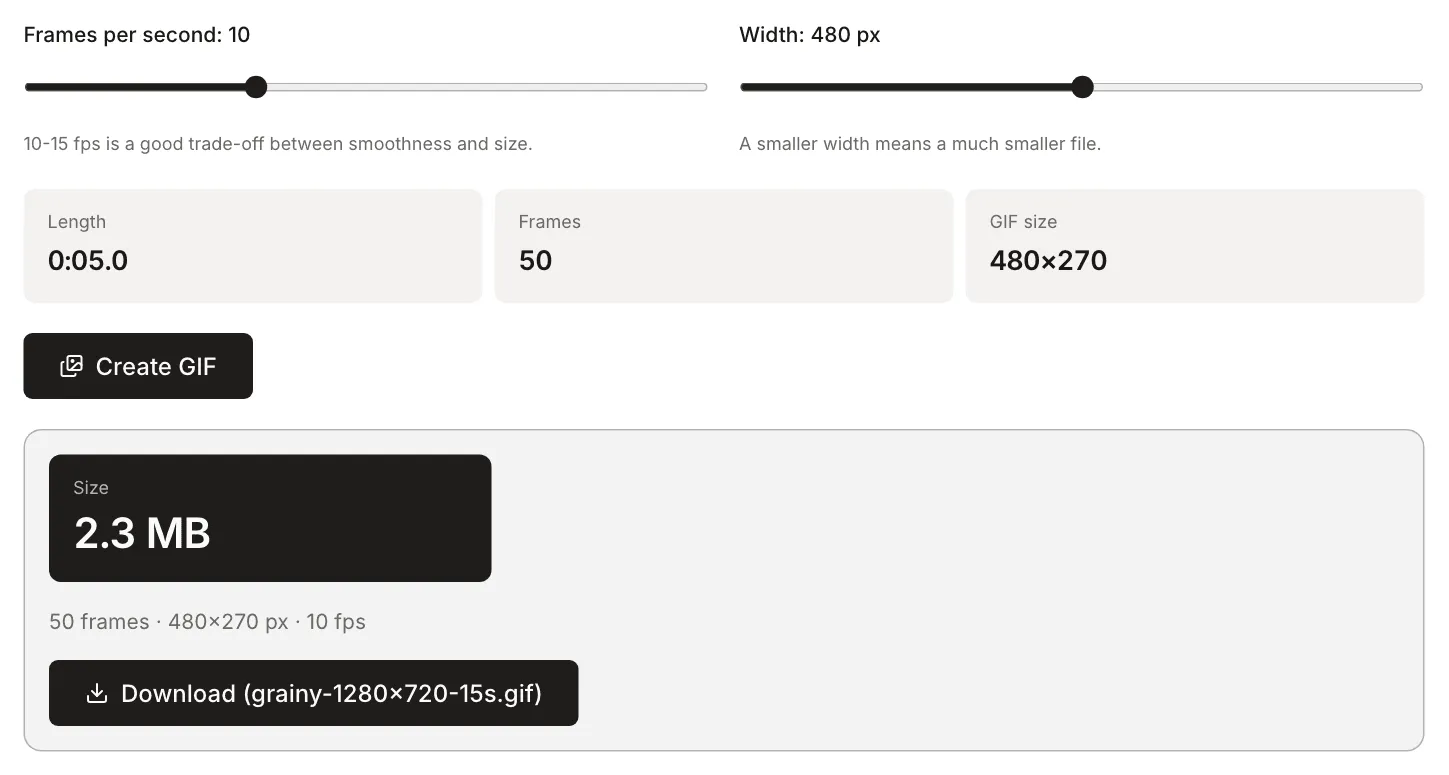
What the numbers show:
- Length scales in a straight line. At 10 fps and 480 px, clips of 3, 5, 10 and 15 s gave 1.4 MB, 2.3 MB, 4.5 MB and 7 MB.
- A frame’s size follows its pixel count. Dividing the file size (measured in Node, not in the tool) by the number of frames gives about 113,000 bytes per frame at 720 px, 47,000 at 480 px and 21,000 at 320 px. Those widths have 44% and 20% of the pixels of 720 px, and the frames are 42% and 19% of the size.
- Going from 15 to 10 fps cut the file by a third. At 480 px, dropping from 10 to 8 fps (40 frames) gave 1.9 MB instead of 2.3 MB.
Carry these numbers over to your own video as proportions only. Size also depends on content. The same clip with light noise instead of heavy grain (a 15 s video of 689.8 KB) produced a 944.4 KB GIF with the settings from step 3, instead of 2.3 MB. Per pixel that is about 0.14 bytes in the smooth clip and about 0.36 in the grainy one. Grain and noise compress worst in a GIF, and flat backgrounds compress best.
When MP4 or WebM is the better choice
If wherever you are posting the animation accepts video, a short MP4 usually beats a GIF on both size and quality. Here are the first 5 s of the same grainy file:
| Version | Dimensions | Frame rate | Size |
|---|---|---|---|
| GIF from Video to GIF | 480×270 | 10 fps | 2.3 MB |
| MP4 after Trim video | 1280×720 | 30 fps | 2.9 MB |
| MP4 after Video compressor, 480p limit, balanced level | 854×480 | 30 fps | 458.4 KB |
The compressed MP4 has about five times fewer bytes than the GIF, even though it has more pixels per frame and three times as many frames per second. This is one test file, so treat it as an illustration and not a promise.
The compressor sets the bitrate from the level and resolution (738 kb/s of video here), not from the content. So on the smooth clip, which weighed 202.6 KB after trimming, the same step produced a file of 451.2 KB, and the tool said it was larger than the original. If the video is already light, keep the trimmed version.
On your own web page, you can embed such a video as a looping image:
<video src="animation.mp4" autoplay loop muted playsinline></video>Browsers block autoplay for video with sound, but not for video that has no audio track or has its audio muted (MDN: Autoplay guide, checked October 2026). You can strip the audio track with Remove audio from video.
GIF remains the right choice when the destination takes images but not video, or when the animation has to play without a player. In that case, keep it to a few seconds and a width at which everything is still readable.
Small things worth knowing
- A GIF stores frame time in hundredths of a second, and the tool rounds it to 10 ms. At 10 fps a frame lasts exactly 100 ms. At 15 fps the file stores 70 ms (measured in Node on the test file), which is 14.3 fps, so 5 s of footage plays for 5.25 s. At 8 fps a frame lasts 130 ms. If exact timing matters, pick 10 or 20 fps (50 ms).
- A GIF has no sound, and this tool makes it loop forever.
- A clip can be 15 s at most. For longer material, shorten the selection or stay with video.
- If the video does not load, the browser probably cannot read its codec. The tool then shows a message that the file could not be read.
- The video is processed in your browser, on your device, and is not uploaded to a server. Time depends on the number of frames and on your computer.