Developers
How to decode a JWT and what it tells you
You can read a JWT without any key, but reading it proves nothing. See what is inside the three parts, how to turn exp into a date, and what a server has to check before it believes what the token says about itself.
- HNarzędzia editorial team
- Published:
A JWT (JSON Web Token, pronounced “jot”) is a string made of three parts separated by dots. The first two are encoded JSON, so a JWT decoder can show them without any key. Decoding tells you who issued the token, who it is meant for and when it expires. It does not tell you whether someone changed it along the way. That takes a signature check.
The three parts
A token looks like header.payload.signature. The format is defined in RFC 7515 (JWS) and the claims in RFC 7519.
| Part | What it holds | Encoding |
|---|---|---|
| Header | a JSON object with the signing algorithm alg and the type typ |
base64url |
| Payload | a JSON object with claims: data about the token and the user | base64url |
| Signature | the result of a calculation over the first two parts, binary data | base64url |
The header and the payload usually start with eyJ. JSON opens with the characters {", and those two characters encode to eyJ. It is a quick way to spot a JWT in a log or in an Authorization: Bearer ... header.
Example: a token signed with a test key
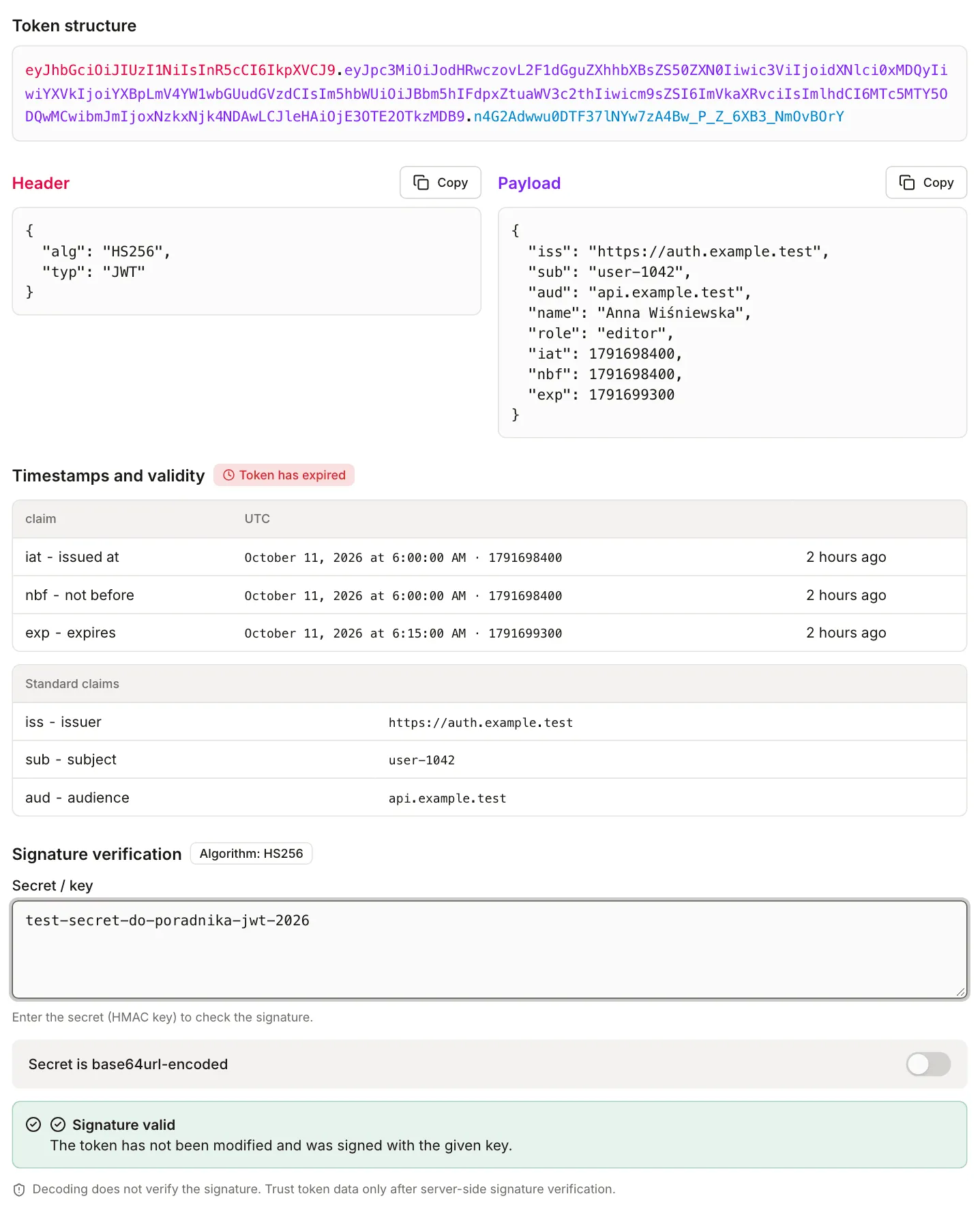
The example is a synthetic HS256 token signed with the test key test-secret-do-poradnika-jwt-2026. All data is made up, and the key is for experiments only. A production HS256 key should be random: RFC 8725 (section 3.5) says a human-memorable password must not be used directly as an HMAC key. You can generate a random secret in the password generator, and the guide How long should a password be, and how to generate a strong one covers length and strength.
eyJhbGciOiJIUzI1NiIsInR5cCI6IkpXVCJ9.eyJpc3MiOiJodHRwczovL2F1dGguZXhhbXBsZS50ZXN0Iiwic3ViIjoidXNlci0xMDQyIiwiYXVkIjoiYXBpLmV4YW1wbGUudGVzdCIsIm5hbWUiOiJBbm5hIFdpxZtuaWV3c2thIiwicm9sZSI6ImVkaXRvciIsImlhdCI6MTc5MTY5ODQwMCwibmJmIjoxNzkxNjk4NDAwLCJleHAiOjE3OTE2OTkzMDB9.n4G2Adwwu0DTF37lNYw7zA4Bw_P_Z_6XB3_NmOvBOrYThe payload after decoding:
{
  "iss": "https://auth.example.test",
  "sub": "user-1042",
  "aud": "api.example.test",
  "name": "Anna Wiśniewska",
  "role": "editor",
  "iat": 1791698400,
  "nbf": 1791698400,
  "exp": 1791699300
}| Field | Meaning |
|---|---|
iss |
issuer of the token |
sub |
subject, usually a user ID |
aud |
audience the token is intended for |
name, role |
custom fields defined by the application |
iat |
when the token was issued |
nbf |
the token is not valid before this moment |
exp |
the token is expired from this moment |
The numbers in this guide refer to Sunday, 11 October 2026, 08:00 UTC (10:00 in Warsaw). If you paste the token later, the relative times in the decoder will differ and the token will be long expired.
With the token and the test key pasted in, the decoder shows the status “Token has expired”. iat and nbf are 06:00:00 UTC and exp is 06:15:00 UTC. Next to each of them the decoder adds “2 hours ago” (exactly 1 hour 45 minutes have passed since exp). The signature is valid at the same time. Expiry and signature are two independent checks, so a token can pass one and fail the other.
Base64url vs Base64
Base64url is Base64 with two changes: - instead of + and _ instead of / (RFC 4648, section 5). JWT also drops the = padding at the end (RFC 7515, section 2). That keeps a token safe inside a URL or an HTTP header. Some plain Base64 decoders reject such a string because they see -, _ or a length that is not a multiple of 4.
The Base64 converter accepts both variants. In “Decode from Base64” mode we pasted the parts of the token one by one:
- The header (36 characters) gave
{"alg":"HS256","typ":"JWT"}, 27 bytes. - The payload (228 characters) gave the JSON above, 171 bytes. The Polish letters in “Wiśniewska” come back intact because the converter reads the bytes as UTF-8.
- The header
eyJhbGciOiJub25lIiwidHlwIjoiSldUIn0(35 characters, no=) was read as{"alg":"none","typ":"JWT"}. - The signature (43 characters, including
_) was accepted, but the converter reported that the result is not UTF-8 text. That is expected: an HMAC-SHA256 signature is 32 binary bytes.
The “URL-safe variant” option works the other way. The text {"alg":"none","typ":"JWT"} is 26 bytes, so standard Base64 gives eyJhbGciOiJub25lIiwidHlwIjoiSldUIn0=, and the URL-safe variant gives the same string without the =.
The signature is calculated from exactly the characters that appear in the token (RFC 7515, section 2, “JWS Signing Input”). If you decode the JSON, change its spacing or field order and encode it again, you get a different string and the signature no longer matches.
You can also read the payload from a terminal without any online tool (Node.js 16 or newer, token in the TOKEN variable):
node -e "console.log(Buffer.from(process.argv[1].split('.')[1], 'base64url').toString())" "$TOKEN"Time in a token: exp, iat, nbf
exp, iat and nbf are numbers of seconds since 1 January 1970, 00:00:00 UTC (RFC 7519, section 2, NumericDate). They can have a fractional part and carry no time zone. The rules in sections 4.1.4-4.1.6:
exp: from this moment the token must not be accepted. At the momentexpit is already expired.nbf: before this moment the token must not be accepted.iat: the time of issue, used to work out the age of the token. On its own it does not decide validity.
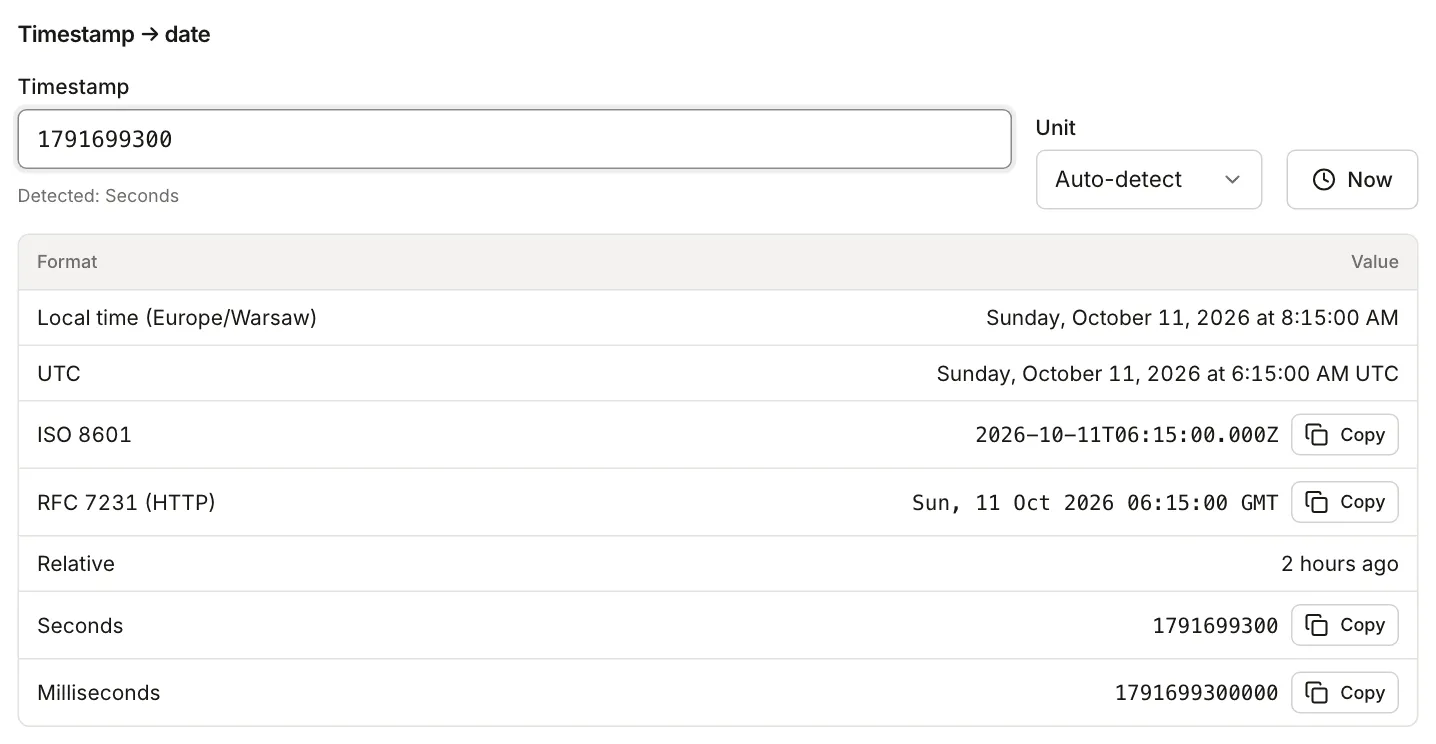
The decoder applies the same rules. The Unix timestamp converter turns the number into a date. For the exp from the example, 1791699300, it shows 06:15:00 UTC and 08:15:00 local time (Europe/Warsaw, UTC+2 in October).
Time zones
A token always carries a moment in UTC. A time zone only appears when the value is displayed, so the same exp is 06:15 in a server log set to UTC and 08:15 in a browser in Warsaw. Two hours of difference is not a bug. Daylight saving changes do not alter the number of seconds in the token, only the local notation. The table in the decoder shows dates in UTC. To see the same moment in your own zone, paste the number into the converter: it shows local time and UTC on separate rows.
Seconds, not milliseconds
A valid exp has 10 digits today. If it has 13, someone wrote milliseconds: Date.now() in JavaScript and System.currentTimeMillis() in Java return milliseconds, while JWT needs seconds (Math.floor(Date.now() / 1000)). The converter detects the unit from the size of the number: for 1791709200000 it picks milliseconds and shows 11:00:00 in Warsaw. A library that reads the same number as seconds gets a year around 58,700, and the token effectively never expires. The decoder catches this too: for such a value it shows a date in the year 58747 and a warning that the value looks like milliseconds.
Clock skew
Imagine a login server whose clock runs 30 seconds fast. It issues a token with iat and nbf set to 08:00:30 while the API server reads 08:00:00. For such a token the decoder shows “Token is not valid yet (nbf)” and nbf as “in 30 seconds”. In practice a freshly issued token is rejected for the first half minute and the error goes away on its own. The decoder compares time exactly, with no tolerance.
RFC 7519 lets libraries allow a small leeway, usually no more than a few minutes. Look for an option named something like leeway or clockTolerance in your library’s documentation. Start by synchronizing the clocks (NTP), though, because a large leeway lengthens the time during which an expired token is still accepted.
An iat in the future does not invalidate a token on its own: the decoder shows “in 30 seconds” and the status “valid”. Treat it as a hint that the clocks have drifted apart.
The alg header
alg says which algorithm signed the token. HS256, HS384 and HS512 use one shared secret (HMAC), so whoever can check the signature can also create one. RS, PS and ES (256, 384 and 512) use a key pair: the private key signs and the public key verifies.
The decoder checks the signature for all of these algorithms. For HS you enter the secret, for the others a public key in PEM format (“BEGIN PUBLIC KEY”) or JWK. It does not support X.509 certificates or keys in the “RSA PUBLIC KEY” (PKCS#1) format. A public key is not secret, so verifying RS and ES tokens in an online tool reveals nothing sensitive. Never enter a production HS secret anywhere except your own server.
Decoding is not verifying the signature
Take the token from the example and change "role": "editor" to "role": "admin" in the payload, keeping the old signature:
eyJhbGciOiJIUzI1NiIsInR5cCI6IkpXVCJ9.eyJpc3MiOiJodHRwczovL2F1dGguZXhhbXBsZS50ZXN0Iiwic3ViIjoidXNlci0xMDQyIiwiYXVkIjoiYXBpLmV4YW1wbGUudGVzdCIsIm5hbWUiOiJBbm5hIFdpxZtuaWV3c2thIiwicm9sZSI6ImFkbWluIiwiaWF0IjoxNzkxNjk4NDAwLCJuYmYiOjE3OTE2OTg0MDAsImV4cCI6MTc5MTY5OTMwMH0.n4G2Adwwu0DTF37lNYw7zA4Bw_P_Z_6XB3_NmOvBOrYThe decoder shows "role": "admin" and the expiry date, like for any other token. Only after you enter the test key does it report “Signature invalid”: the key is different or the token was modified. Without a key the decoder cannot tell an original token from a tampered one, and a note under the result says that decoding does not verify the signature.
A server that accepts a token should, in this order:
- Verify the signature with an algorithm from its own allow-list, not the one named in the token header (RFC 8725, section 3.1).
- Check
expandnbf. - Check the issuer
iss(section 3.8) and the audienceaud(section 3.9). - Only then use
sub,roleand the other fields.
A browser app can read the payload to show the user’s name. Do not base authorization decisions on that reading, because the user can change anything their browser sees. The server has to check the role.
Why the payload is not encrypted
A plain JWT is signed, not encrypted. The signature protects against changes, not against reading: base64url is a way of writing bytes, not a cipher. Anyone who has the token (a proxy, a log, someone with access to a HAR file) can read the name and role just like in the example.
RFC 7519 (section 12) names three options: an encrypted JWT, sending the token only over an encrypted channel with an authenticated recipient (TLS), or leaving the sensitive data out, which is the simplest. Do not put passwords, national ID numbers, card numbers or health data in a token.
An encrypted token (JWE) has five parts instead of three. The decoder recognizes it by the number of dots and says that its content cannot be read without the decryption key.
What not to paste into online tools
A JWT works like a temporary password: whoever holds it can use it until exp. A few rules:
- Do not paste production tokens into sites you do not control. The HNarzędzia decoder runs in the browser. In our test the browser sent no network request after the token and key were pasted, and you can check that yourself on the “Network” tab of your browser’s developer tools. That only applies to this page, not to other decoders.
- For experiments use tokens from a test environment or your own, like the one in this guide.
- Read a production token locally, for example with the command from the earlier section.
- Never enter a production HMAC secret into an online tool. For RS and ES algorithms the public key is enough.
- Before you send a screenshot, a HAR file, a log or a bug report, remove the
Authorizationheader and any tokens in URLs. If you must show a token, share only the header and payload, without the signature, and mask personal data. - Revoke a token that ended up in the wrong place with the issuer (sign out the session, revoke the token). If a signing key leaks, the key has to be rotated. A short
explimits the damage.
Common errors
| Symptom | Most likely cause | What to check |
|---|---|---|
| A 401 response some time after login | exp has passed |
exp in the decoder, refresh the token or sign in again |
| A fresh token is rejected for the first seconds | nbf or iat in the future, issuer and server clocks differ |
the “not valid yet” status in the decoder, clock synchronization |
| A token never expires | exp in milliseconds (13 digits) |
the milliseconds warning in the decoder, the Unix timestamp converter, divide by 1000 |
| “Signature invalid” | wrong secret or key, a space or newline in the secret, a base64-encoded secret (turn on “Secret is base64url-encoded”), token modified after signing | the secret copied without whitespace, the same key on both sides |
| “This does not look like a JWT” | the token is truncated in a log or a dot is missing | three parts separated by dots; the decoder strips a Bearer prefix, quotes and whitespace on its own |
| “The header or payload is not a valid JSON object” | the decoded text is not JSON | the part decoded in the Base64 converter, fixes from the guide Fix invalid JSON |
| Five parts instead of three | it is a JWE token, encrypted | the decryption key held by the recipient; the decoder cannot read it |
A token with alg none
RFC 7519 (section 6) allows an unsecured token: alg is none and the signature is an empty string, so the token ends with a dot. That can be legitimate when something else protects the content, such as TLS (RFC 8725, section 3.2).
The problem starts when a server trusts the header. An attacker changes alg to none, removes the signature and writes whatever they like. Some libraries accepted such a token as valid (RFC 8725, section 2.1, which also describes a similar attack that turns RS256 into HS256 and uses the public key as the HMAC secret). The defense is an algorithm list fixed on the server side (section 3.1) and a library that does not accept none unless you explicitly ask for it (section 3.2).
For a token with the header {"alg":"none","typ":"JWT"} and the role admin, the decoder shows a warning (Algorithm “none” means an unsigned token. Do not trust it.) and the verification step reports that the algorithm is not supported.
eyJhbGciOiJub25lIiwidHlwIjoiSldUIn0.eyJpc3MiOiJodHRwczovL2F1dGguZXhhbXBsZS50ZXN0Iiwic3ViIjoidXNlci0xMDQyIiwiYXVkIjoiYXBpLmV4YW1wbGUudGVzdCIsIm5hbWUiOiJBbm5hIFdpxZtuaWV3c2thIiwicm9sZSI6ImFkbWluIiwiaWF0IjoxNzkxNzA1MzAwLCJuYmYiOjE3OTE3MDUzMDAsImV4cCI6MTc5MTcwODkwMH0.Sources
Checked in October 2026.
- RFC 7519: JSON Web Token (JWT), sections 2 (NumericDate), 4.1.4-4.1.6 (
exp,nbf,iat), 6 (unsecured JWTs) and 12 (privacy). - RFC 7515: JSON Web Signature (JWS), sections 2 (base64url) and 5.2 (signature validation).
- RFC 4648: Base-N Encodings, section 5 (Base 64 encoding with URL and filename safe alphabet).
- RFC 8725: JSON Web Token Best Current Practices, sections 2.1, 3.1, 3.2, 3.5, 3.8 and 3.9.